AI settings
The AI settings tab controls how the Mitzu AI assistant (the chat agent that answers questions, builds charts, and reads your catalog) behaves inside this workspace. There are two knobs:
- A persistent Custom instructions entry that is included in every conversation — your workspace's "system prompt."
- Whether the agent is allowed to search the web in real time while answering.
Organizations that have the option enabled can also run the AI features on their own Anthropic account. Those credentials are organisation-wide, so they live in Settings → Organisation → AI credentials (see Anthropic credentials below).
Mitzu always picks the model that powers the agent, routing each request to the best-fit Claude model for the task, unless your organisation has set its own model id under Anthropic credentials.
Only Workspace Admins can change these settings. The AI settings tab itself only appears when the AI feature is enabled for your organization — or, on a self-hosted deployment without a Mitzu-wide Anthropic key, when your organization is allowed to bring its own key (see Anthropic credentials below), so that the key can be entered in the first place.
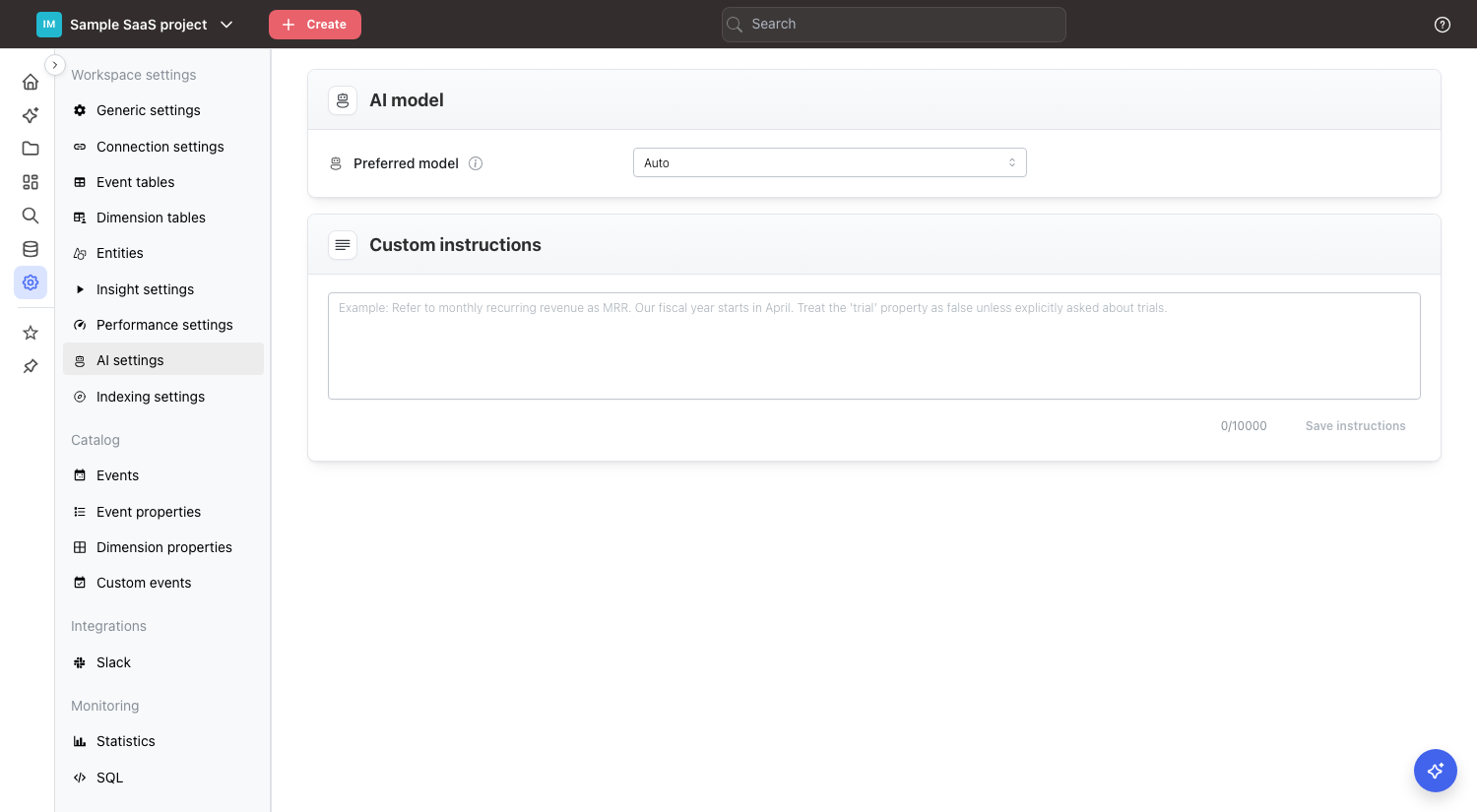
Custom instructions
Standing context added to every AI conversation in this workspace. Use it to teach the agent domain language, reporting conventions, and business rules that aren't obvious from the catalog alone.
What to put here
Good custom instructions tend to cover:
- Terminology and acronyms. "Refer to monthly recurring revenue as MRR.", "In this workspace, 'deal' always means a closed-won opportunity."
- Calendar conventions. "Our fiscal year starts in April.", "The business week runs Monday–Sunday."
- Defaults for ambiguous filters. "Treat the
trialproperty asfalseunless the user explicitly asks about trials.", "Exclude internal test accounts (user_email ending in@mitzu.io) by default." - Reporting style. "Prefer weekly granularity unless the user asks for daily.", "Always break down by country when a geographic cut is possible."
- Safety rails. "Never join raw payment tables into public dashboards."
What not to put here
- Secrets, API keys, or credentials — the prompt is visible to every workspace admin.
- One-off questions — use a normal AI chat for those.
- Giant rulebooks — the prompt is capped at 4,000 characters. The counter under the box turns red when you go over, and the Save instructions button is disabled until you trim it.
Saving
Edits to the Custom instructions are not auto-saved. Click Save instructions to persist your changes; you'll see a success notification at the top right of the screen. Closing the tab with unsaved edits discards them.
How it composes with other context
The Custom instructions are one layer of context the agent receives. The full order is:
- Mitzu's built-in system prompt (how the agent reasons, which tools it can call).
- Your workspace Custom instructions (this setting).
- The user's own personal AI custom instructions, which take precedence over the workspace ones when they conflict.
- The user's individual message in the chat.
Mitzu's built-in system prompt always applies. Below it, a user's personal instructions win over the workspace Custom instructions when the two conflict, and a message in the chat can refine either. For example, if the Custom instructions say "always exclude test accounts", a user can still ask "include test accounts this time" — the workspace default is a default, not a hard rule.
Web search
Off by default. When enabled, the AI agent can use Anthropic's built-in WebSearch tool to look up information on the public internet while answering — useful for questions that depend on current external context (industry benchmarks, public company news, third-party documentation).
Things to know before flipping it on:
- The agent decides what to search for. To do its job it will send the user's question (and any context it considers relevant — including text from your catalog or chat history) to a third-party search provider.
- Web results are untrusted content. Treat anything the agent quotes from the web the same way you'd treat a random page on the internet, not authoritative workspace data.
- Responses become non-deterministic. The same question can return different answers as the underlying web pages change.
- Only Workspace Admins can change this setting, and the toggle applies to every AI conversation in the workspace until it's turned off.
If your workspace handles sensitive data or you need reproducible answers, leave it off.
Anthropic credentials
By default every AI and agentic feature runs on Mitzu's own Anthropic account, and your usage counts against the AI query allowance of your plan. If you would rather be billed by Anthropic directly, Mitzu can enable this for your organization — contact support@mitzu.io to have it turned on.
The credentials are managed in Settings → Organisation → AI credentials. Until the option is enabled, that page shows a note telling you to contact support; the key, auth method, host and model fields only appear once it is on.
Once enabled, the section takes four values, in this order:
- Host — optional. The base URL requests are sent to, for an Anthropic-compatible gateway or proxy. It must be an
https://URL and may include a path, e.g.https://gateway.example.com/anthropic. Mitzu appends/v1/messagesitself, so do not include/v1or/v1/messages. The host must resolve to a globally routable address; loopback, private, carrier-grade NAT and other non-public hosts are rejected. Leave it empty to call the Anthropic API directly. - API key — an Anthropic API key from your own Anthropic account. It is never shown again after you save it; the field only tells you whether a key is currently saved. It is always stored encrypted at rest — a deployment without secret encryption configured refuses to store it at all.
- Auth method — how the key is sent to the host. API key header sends it as
x-api-key; it is the default and whatapi.anthropic.comexpects. Bearer token sends it asAuthorization: Bearer, for gateways that authenticate that way. Switching the method does not require retyping the key. - Model — by default Mitzu picks the model, and the field shows the exact id it prefers (
claude-sonnet-5-5) greyed out so you know what to expect. Tick Use a custom model id to send your own id instead, for gateways that expose Claude under their own names, e.g.eu.anthropic.claude-sonnet-5-5. A custom id is used for every AI call of the organization, including the lightweight tasks Mitzu would normally run on Haiku. Untick the box to go back to Mitzu's default; the tooltip next to the field always names it.
Things to know:
- The credentials are organization-wide, not per workspace. Every workspace of the organization uses them.
- They cover every AI call Mitzu makes for your organization: the chat agent, its subagents, the configuration agent, scheduled agent runs, and the summaries and trigger evaluations behind scheduled-agent emails.
- While a key is set, the Mitzu AI query allowance is not enforced and the usage widget is hidden — you pay Anthropic for the tokens instead. Note that if the option is later switched off mid-period, the queries you ran on your own key do count towards the allowance again.
- Only Admin users can view or change this section.
- To save a new Auth method, Host or Model without retyping the key, leave the API key field empty and click Save credentials. The very first save must include a key.
- Remove key deletes the stored credentials and moves every AI feature back onto Mitzu's account, with the plan allowance applying again.
Test connection
Test connection sends one tiny request (a single output token) to <host>/v1/messages with the values currently in the form: the typed key, or the stored key when the field is blank, together with the auth method, host and model as entered. Nothing is saved by the test. The notification tells you whether the credentials, the host path and the model id were accepted, or which of them the host rejected, and the same result stays visible under the buttons until you dismiss it. On a failure, Show gateway response in that panel reveals the raw reply of the host (status and error message, with the key masked), which is what to paste into a support request. Redirects are not followed; enter the final URL as the host instead. The request is billed to the key it was sent with.
If the key is rejected by Anthropic (revoked, out of credit, or wrong host), AI requests for the organization fail until you correct or remove it — Mitzu does not silently fall back to its own key.
Tips
- Keep the prompt short and declarative. One rule per line is easier for the model to follow than long prose.
- When you add a new rule, re-run a few representative questions to make sure the agent honors it.
- If the agent starts ignoring part of your prompt, check whether the catalog contradicts it (the catalog wins for factual questions).