Mitzu in your own AWS account
Give your team warehouse-native product analytics and an AI agent, on infrastructure you own. Subscribe in AWS Marketplace, launch one CloudFormation stack, and Mitzu runs in your account, next to your data.
Why run Mitzu in your account
The services, the database and your warehouse credentials all live in your account. Mitzu has no access to your account or your logs.
Mitzu queries your warehouse in place, so your warehouse stays the source of truth. Connect Snowflake, BigQuery, Redshift, Databricks and more.
The Mitzu agent runs on Claude with your own Anthropic key or your own gateway, and every AI call is billed to your account with that provider.
Connect Claude, Claude Code, Cursor, ChatGPT and other MCP clients. People sign in as themselves and pick the workspace each client may use.
Start with invites, then connect any OpenID Connect provider, such as Okta, Microsoft Entra ID or Google Workspace. Your subscription sets the number of seats.
Services update one at a time, so Mitzu stays available. The database and file storage are encrypted, with 14 days of database backups and alarms for the failures that matter.
How it works
The stack creates its own network and runs five small services on ECS Fargate. Select the diagram to enlarge it, or open the interactive version.
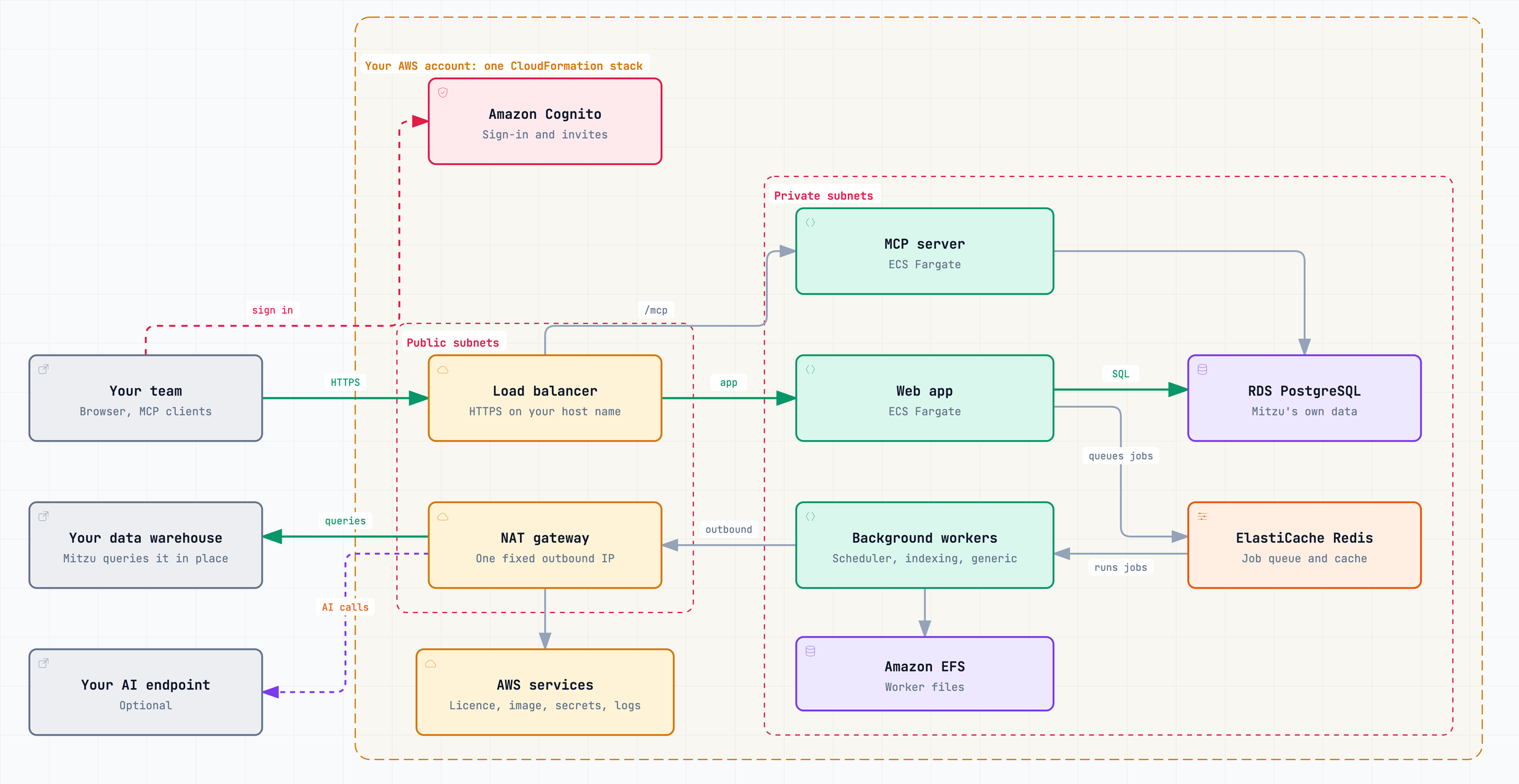
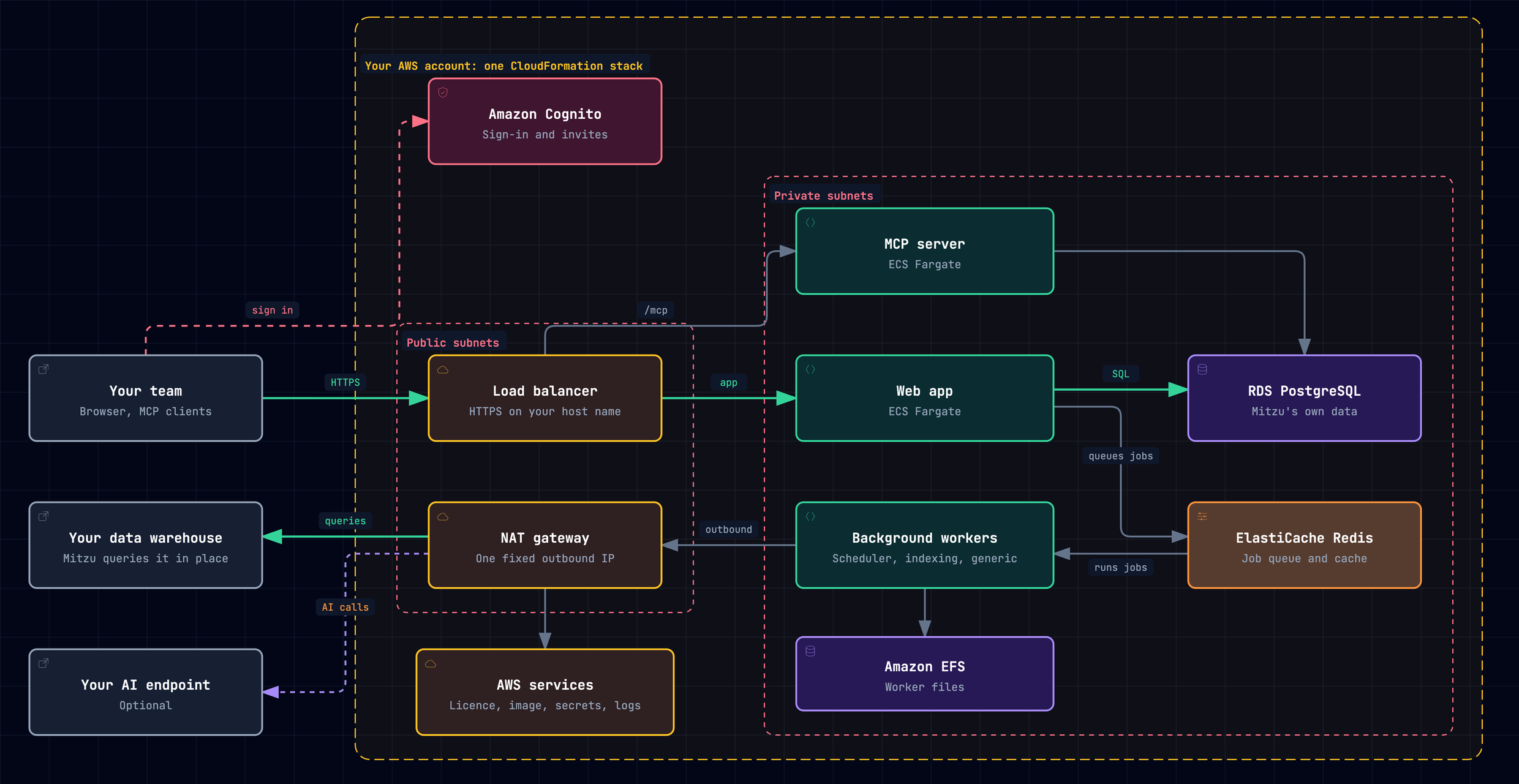
- People come in over HTTPS. The load balancer sends MCP traffic to the MCP server and everything else to the web app. Amazon Cognito handles passwords and invites until you connect your own identity provider.
- Long-running work happens in the background. Jobs wait in Redis until the scheduler, indexing and generic workers pick them up, so a large indexing run doesn't slow down the people using the app.
- Mitzu's own data stays private. PostgreSQL holds workspaces, dashboards and saved insights, and neither it nor the cache can be reached from outside the stack's network.
- Outbound traffic leaves through one address. Allow that one IP on your warehouse. Every host the deployment can reach is listed in Outbound connections.
From subscription to first chart
Pick a region and a host name, create the certificate and decide who can reach Mitzu.
Subscribe in AWS Marketplace and launch the stack from the link it gives you. It takes about 15 minutes.
Your invitation email has the address and a temporary password. Create your workspace, and try it on sample data if you'd like to look around first.
Add your connection and your event tables. Mitzu indexes them automatically, and you can start building insights.
Invite people by email and connect single sign-on when you're ready.
Add your AI credentials and point your MCP clients at your own Mitzu address.
After that, Operate covers licences, upgrades, logs, alarms, backups and teardown.
What it costs
- AWS infrastructure: roughly 230 USD a month at the default sizes in us-east-1, billed by AWS to your account. Data transfer comes on top.
- Mitzu subscription: the offer you accept in AWS Marketplace, for the platform and your seats.
- AI, if you turn it on: billed to your account with your AI provider.
Ready to start? Plan your launch.