Operate your stack
Licence
Settings → Organisation → Overview shows your Marketplace licence: its status, seats in use, when it ends and the last good check. Mitzu checks the licence at startup and every 15 minutes.
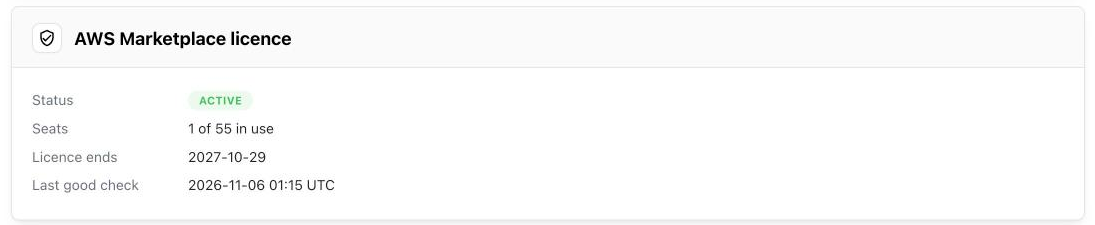
Mitzu keeps working for 30 days after the licence ends, or after the last successful check if checks start failing, and the overview shows the date queries will stop. A renewal or the next successful check restores everything without a restart.
Upgrades
- In AWS Marketplace, open Manage subscriptions, choose Launch next to Mitzu, choose ECS and pick the new Version.
- Expand Release notes and copy the image URI. It ends in
@sha256:…, so it always means exactly that build. Then copy the address of the CloudFormation template link under Deployment templates. - In CloudFormation, select the stack and choose Update stack → Make a direct update.
- Choose Replace existing template and paste the template address as the Amazon S3 URL. A new version can need changes to the stack, so don't keep the old template.
- Replace
ImageUri, leave the other parameters as they are, then tick the IAM acknowledgement and submit.
The update migrates the database before any service changes, then replaces the services one at a time, so Mitzu stays available. If the migration fails, CloudFormation rolls back to the previous version.
Secrets
The stack keeps every secret in Secrets Manager; each one's description starts with the stack
name. To change one, for example the stack-wide Anthropic key, store the new value and then choose
Force new deployment for the five services of the stack's ECS cluster (web, scheduler,
indexing, generic, mcp).
To change your identity provider's client secret, enter the new one under Settings → Organisation → SSO and choose Save. Mitzu keeps it in its own database, not in Secrets Manager.
Don't change the database or encryption-key secrets by hand: the database password is set by RDS, and the encryption key protects the warehouse credentials already stored.
Loading the sample workspace removes the default PUBLIC access to the mitzu database, so the sample's
read-only role can't connect to it. If you added your own database role that relied on that access, such as a
reporting or monitoring user, run GRANT CONNECT ON DATABASE mitzu TO <role>.
Email
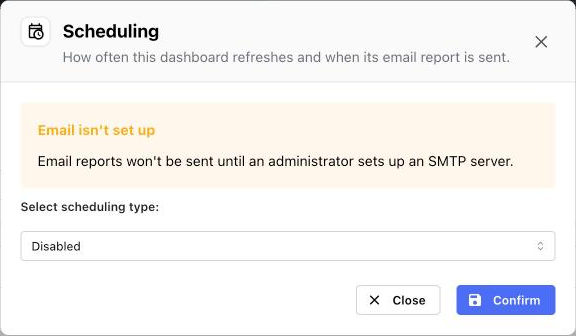
Mitzu sends alert, dashboard report, scheduled agent and other notification emails through an SMTP server you choose. Without one, those screens say that email isn't set up, and nothing is sent. Invites don't need it: they go through Cognito.
To set it up with Amazon SES:
- In SES, verify your sending domain, request production access and create SMTP credentials.
- In CloudFormation, choose Update stack → Make a direct update → Use existing template, and set
SmtpHost(for exampleemail-smtp.us-east-1.amazonaws.com),SmtpUsernameandEmailSender. - In Secrets Manager, store the SMTP password in the secret named by the
SmtpPasswordSecretArnoutput as{"password":"..."}, then choose Force new deployment for the five services.
Logs
Every container logs to the CloudWatch log group in the LogGroup output (/mitzu/<stack name>),
kept for 30 days, with one stream per task. To find one service's lines, open the task in the ECS
console: its Logs tab reads the same group.
To check health from outside, open https://<your host>/ping; it answers 200 while the web service
is up.
Alarms
Set AlarmEmail to receive these by email (confirm the subscription AWS sends first):
| Alarm | Meaning |
|---|---|
| Web unhealthy | No healthy web task behind the load balancer. |
| MCP unhealthy | No healthy MCP task behind the load balancer. |
| Scheduler stopped | The scheduler, which runs indexing and refreshes, has no running task. |
| Licence check failing | The licence check has failed for 24 hours; the overview shows the error. |
| Database storage | The database has less than 5 GB free. Increase DbAllocatedStorage. |
Contacting support
Send support@mitzu.io the stack's region and ImageUri, the time of
the problem, and the matching lines from the log group. Mitzu has no access to your account or your
logs.
Backups
RDS keeps automated backups for 14 days, so you can restore the database to any point in that window from the RDS console. Restoring creates a new database; point a stack at it only with Mitzu support.
Teardown
With DbDeletionProtection set to true (the default), first update the stack with it set to
false; otherwise the deletion stops at the database. Deleting the stack then removes everything it
created except:
- A final RDS snapshot, taken automatically so you can recover. Delete it in the RDS console when you no longer need it.
- The Container Insights log group
/aws/ecs/containerinsights/<stack name>/performance. It keeps data for one day and costs nothing; delete it if you want a clean account.
Resources you created yourself also stay: the ACM certificate, your DNS record if you made it by hand, an SES identity, and your Marketplace subscription, which you cancel in AWS Marketplace.