Experiments
You run A/B tests in an experimentation or feature-flag tool, and the events those tests are meant to change land in your data warehouse. An experiment in Mitzu describes one of those tests — who was exposed to it, which variant each user saw, what it should change and when it ran — and measures it on your warehouse data with the same saved insights your team already uses.
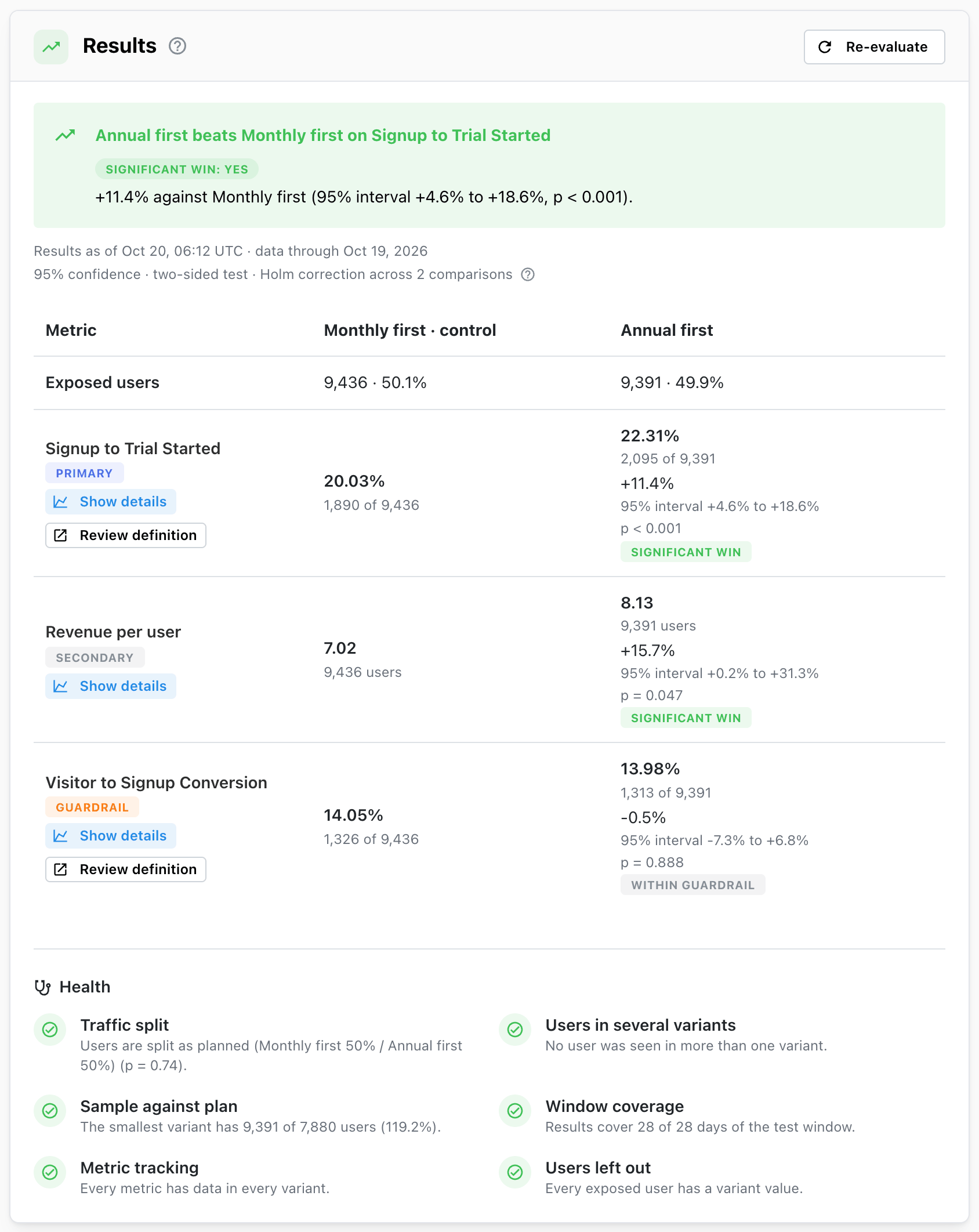
Mitzu never assigns users to variants, turns flags on or changes a running test. It reads the data your tool and your product already write, compares every variant with the control, and tells you whether the difference is real.
Experiments is in early access. If you don't see Experiments in the left sidebar, ask us to enable it for your workspace.
Use cases
Product
- Did the new onboarding checklist get more signups to create their first document?
- Which of the three pricing page layouts sells the most annual plans?
- Did the redesign raise conversion without making more people cancel?
Marketing and growth
- Which landing page headline turns more visitors into signups?
- Does sending the trial reminder on day 3 instead of day 7 lift trial-to-paid conversion?
- Is the winning variant worth rolling out, or is the lift too small to matter?
Data and analytics teams
- Do the numbers in our experimentation tool match what we see in our own warehouse?
- Was the traffic split as planned, and did anyone see more than one variant?
- Which tests did we run last quarter, what did we decide, and why?
How an experiment works
- Describe the test. Pick the exposure event that marks a user entering the test, the property that says which variant they saw, the test window and the saved insights to measure. See Setting up an experiment.
- Schedule it. Scheduling locks the definition, so the analysis can't be bent to fit the results once they come in. See Stages of an experiment.
- Evaluate. Mitzu queries your warehouse and computes every metric for every variant. Nothing runs on its own: results are computed when you press Evaluate. See Evaluating an experiment.
- Read the verdict. The Results card says whether a variant beats the control on the primary metric, how sure you can be, and whether anything about the test makes the comparison untrustworthy. See Results and verdicts and Health checks.
- Finalize. Record the outcome, the decision and a summary. The results are frozen with the decision, and you can save each variant's users as a cohort and mark the test and the roll-out on your charts. See Finalizing.
What you see on an experiment
| Card | What it holds |
|---|---|
| Details | The hypothesis, the stages timeline, the test window, the population and the variants |
| Results | The verdict, one row per metric with each variant's value and lift, and the health checks |
| Summary | The recorded outcome, decision and summary, once the experiment is finalized |
| Follow-up | Variant cohorts and annotations created from the experiment |
| Metrics | The saved insights measured, their role and the direction that counts as good |
Where to go next
- New to A/B testing in Mitzu: Why Experiments exists and Core principles.
- Running tests as a marketer or product manager: Running experiments in Mitzu and Reading results without statistics.
- Setting up your first experiment: Data requirements.
- Checking the maths: Statistical methods.