Evaluating an experiment
Experiment results are computed when you ask for them, and once more on their own after the experiment end date. Evaluate queries your warehouse and computes every metric for every variant over the test window so far; every page afterwards reads the stored results, so opening an experiment is instant and costs no warehouse query.
Running an evaluation
Once an experiment is scheduled and its test window has begun, Evaluate appears in the page header and in the header of the Results card. After the first run it reads Re-evaluate.
- Click Evaluate. The button turns into a red Cancel with
Evaluating…, and the Results card saysComputing the results. This page updates when they are ready. - Wait. Each metric is one or two queries against your warehouse — the totals and the day-by-day numbers — plus one more for the primary metric's distinct users. Most evaluations take about as long as running the saved insights themselves.
- The page updates on its own when the results land. You can leave the page and come back; an evaluation that is still running shows as running, with Cancel.
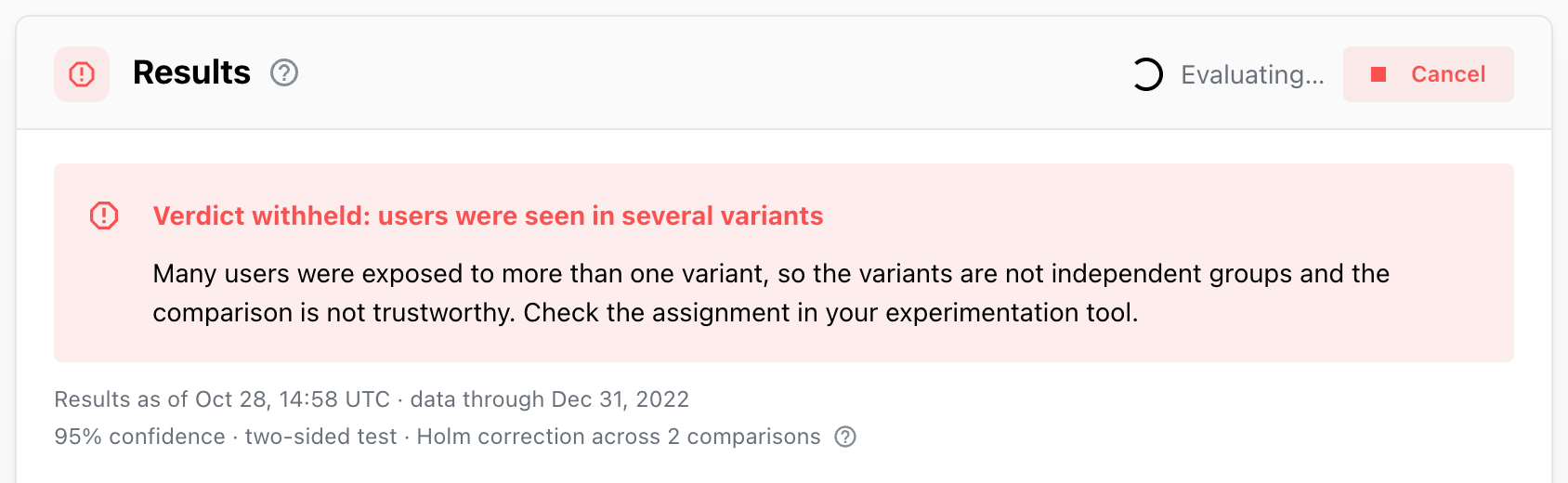
Cancel stops the evaluation and its warehouse queries. The previous results stay on screen:
Evaluation cancelled. The previous results are kept.
What an evaluation covers
- Exposures from the first day of the allocation window up to the moment the evaluation runs, or
the allocation end if that came first. Metrics are measured up to the moment the evaluation
runs, or the experiment end date if that came first. While the window is open, that includes today's data so far, which is
still arriving. The
data throughdate names the last full day: yesterday, or the end date. - Every metric of the experiment, with the current version of its saved insight.
- The day-by-day numbers behind Metric details over time.
- The counts the health checks need: users per variant, users seen in several variants, users without a variant.
The Results card says when the results were computed and which day they cover:
Results as of Oct 27, 09:41 UTC · data through Oct 26, 2026.
When to evaluate
- During the test, as often as you like, to check that exposure is coming in, the split looks right and no metric is broken. The numbers are labelled incomplete and have no verdict.
- After the end date, once more. The experiment stays
Running · incompletewithEnded · re-evaluate for the final numbersuntil this run covers the last day; then it becomes ready for decision and shows a verdict. Mitzu runs this evaluation for you; see below. - After a saved insight changes, when the Results card says the results are out of date.
If a metric has a long conversion window — a 14-day trial-to-paid funnel, say — users exposed near the end of the test haven't had time to convert by the day after the window ends. Wait for the conversion window to pass before the final evaluation, or their rates will be too low in every variant.
Automatic evaluation after the end date
Every morning (05:00 UTC) Mitzu looks for experiments whose end date passed in the last 3 days and whose owner hasn't been emailed the results yet. For each one it queues an evaluation, run as the experiment's owner, exactly as if they had clicked Re-evaluate. The results are stored as usual and show on the experiment page.
When those results cover the end date, Mitzu emails the owner once:
- Subject:
Experiment results are ready: <name>. - The dates:
<name> ended on Oct 21, 2026. The evaluation covers data through Oct 21, 2026. - The primary verdict in one sentence, for example
Annual first beat Monthly first on Signup to Trial Started (+11.4%).,No clear winner on Signup to Trial Started: no variant differed enough from Monthly first to be sure.orToo few users to decide on Signup to Trial Started. - An Open the results button that opens the experiment page, to check the other metrics and the health checks and record the decision.
What the automatic evaluation skips:
- drafts, archived and finalized experiments;
- an experiment whose evaluation is already running that morning; it is picked up the next morning, while the end date is still within the last 3 days;
- an experiment whose owner is no longer in the organization.
The 3-day look-back means a missed morning, for example during an outage, is caught up on the next one. An experiment whose end date passed more than 3 days ago is not evaluated automatically; evaluate it yourself.
The email is sent at most once per experiment. If the experiment goes back to draft and is saved with a changed definition, it can be sent again for the new definition. Evaluating the experiment yourself before the morning job runs doesn't send an email; the job still runs once and emails the owner.
If a metric has a long conversion window, set the experiment end date late enough after the allocation end for it, so the automatic evaluation already sees the final numbers.
Out-of-date results
Stored results don't change on their own. The Results card tells you when they no longer match the experiment:
| Note | What happened |
|---|---|
A metric's saved insight, or a filter group it uses, changed since these results were computed. Re-evaluate to update. | Someone edited a metric's insight or a filter group it uses |
The definition changed since these results were computed. Re-evaluate to update. | The experiment's own definition changed |
The saved insight of this metric was deleted. | A metric's insight no longer exists |
Out-of-date results have no verdict, and a ready experiment shows as Running · incomplete, without
Finalize, until you re-evaluate.
When an evaluation fails
- The whole run fails — the warehouse is unreachable, a query times out — and a
Couldn't evaluate the experimentnotification shows the reason. The previous results stay. - One metric fails and the others succeed. The failing metric's row says why. If it is the
primary metric, there is no verdict:
No verdict: the primary metric has no results, with the hintChange the primary metric, or re-evaluate if the error was temporary.
Messages you may see on a metric:
| Message | What to do |
|---|---|
No exposed users were found in the test window. | Check the exposure event, its filters and the window |
Only one variant was found among exposed users, so there is nothing to compare. | The variant property has one value; check the property and the filters |
The control variant '…' was not found. Variants in the data: … | The control's value doesn't appear in the data; pick another control |
The ratio is undefined for …: its exposed users have no value for the formula's B segment. | No exposed user in that variant did the denominator event |
The control's value is 0, so no relative lift can be computed. Only metrics with a positive control value can be tested. | A per-user metric needs a positive control value |
Evaluating a finalized experiment
On a finalized experiment, Re-evaluate computes the results again from today's data and compares them with the recorded decision, without replacing it. See Reopening and re-evaluating.
Warehouse cost
An evaluation runs the same kind of queries as the saved insights it measures, for the whole window and grouped by day. The only scheduled run is the single evaluation after the end date; otherwise an experiment nobody evaluates costs nothing. Insights with sampling turned on keep it in the experiment too.