Metric details over time
The results table gives one number per variant for the whole test window. Metric details show how that number built up, day by day: whether the lift settled early and stayed, or spiked in the first days while the change was new and faded since.
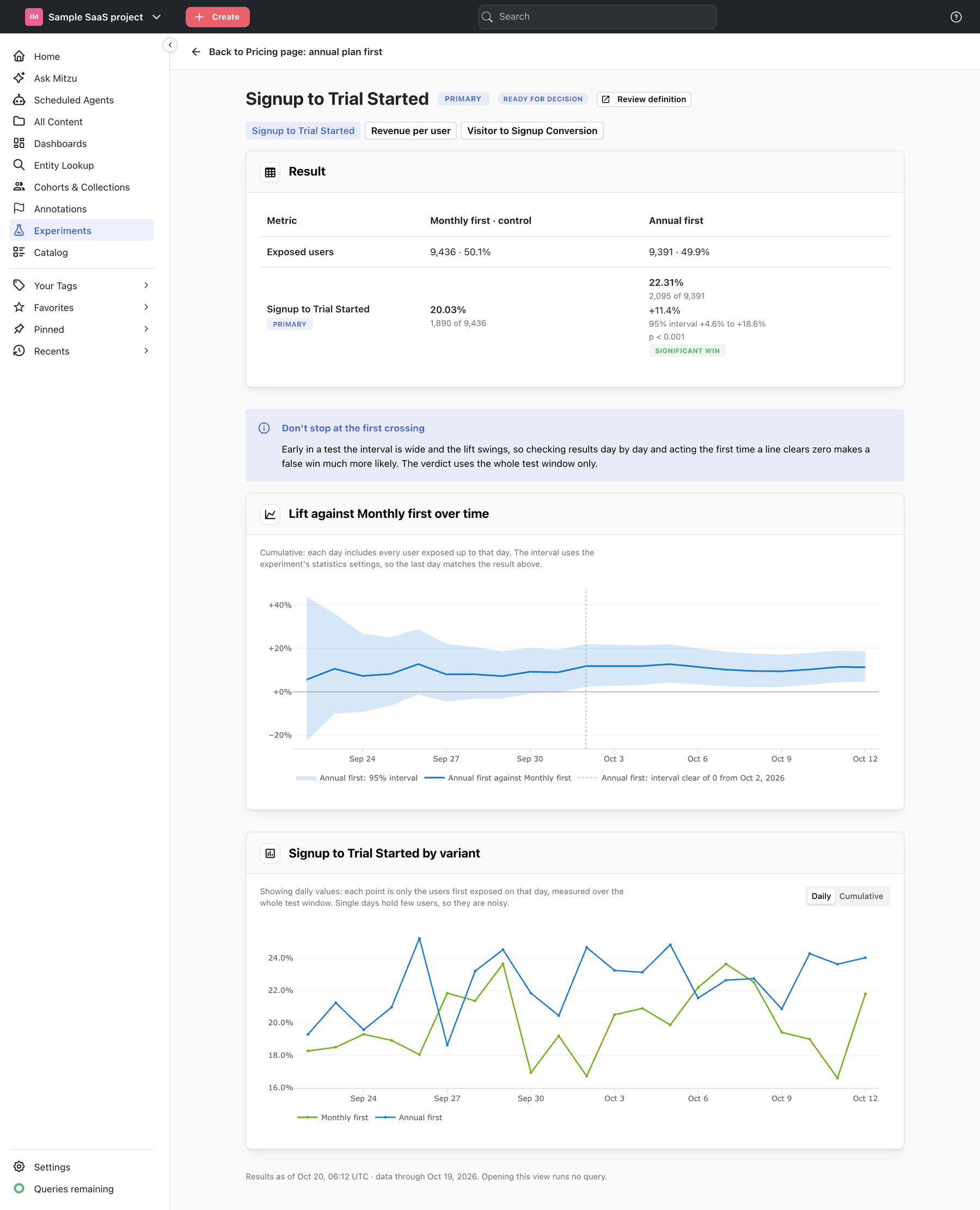
To open it, click Show details under a metric in the results table, or click the metric's name. Opening it runs no query: the day-by-day numbers are stored by each evaluation.
What the page shows
Result. The metric's row from the results table, with the same numbers.
Lift against the control over time. One line per variant, showing the cumulative lift against the
control: each day includes every user exposed up to that day. The shaded band is the confidence
interval of one variant — the leader by default. Pick another under Interval for. A dotted marker
shows the day from which the interval stays clear of zero, with a legend entry such as
Annual first: interval clear of 0 from Oct 2, 2026.
The interval uses the experiment's statistics settings, including the multiple-comparison correction, so the last day matches the result above. With a one-sided test the band shows only the bound that is tested.
The metric by variant. One line per variant with its value, under a Daily / Cumulative switch. The caption under the chart says which one you are looking at:
Showing cumulative values— each point is every user exposed up to that day. The line answers "what would the result be if the test had stopped on this day?", and the last day is the value in the result above. It moves less and less as users pile up, so it is the line to read for the overall effect.Showing daily values— each point is only the users first exposed on that day, measured over the whole test window. The line answers "did users who entered on this day behave differently?". Single days hold few users, so they are noisy; use it to spot a day that stands out, such as an outage or a campaign, not to judge the effect.
The results on the experiment page are always cumulative.
Buttons at the top switch to the experiment's other metrics; Back to … returns to the experiment.
Reading the lines
- A lift that settles and stays. The line wanders for the first days, then flattens, and the interval narrows around it. This is what a real, lasting effect looks like.
- A lift that fades. Large in the first days and shrinking ever since. Often a novelty effect: returning users try the new thing because it is new. The final lift may overstate the long-term effect; consider a longer test or a follow-up.
- A line that crosses zero and back. The variants are close. Expect
No clear winnerunless the sample is large. - A step on one day. Something else changed that day — a release, a campaign, an outage. Check the annotations on that date.
Early in a test the interval is wide and the lift swings, so checking results day by day and acting the first time a line clears zero makes a false win much more likely. The verdict uses the whole test window only.
Running experiments
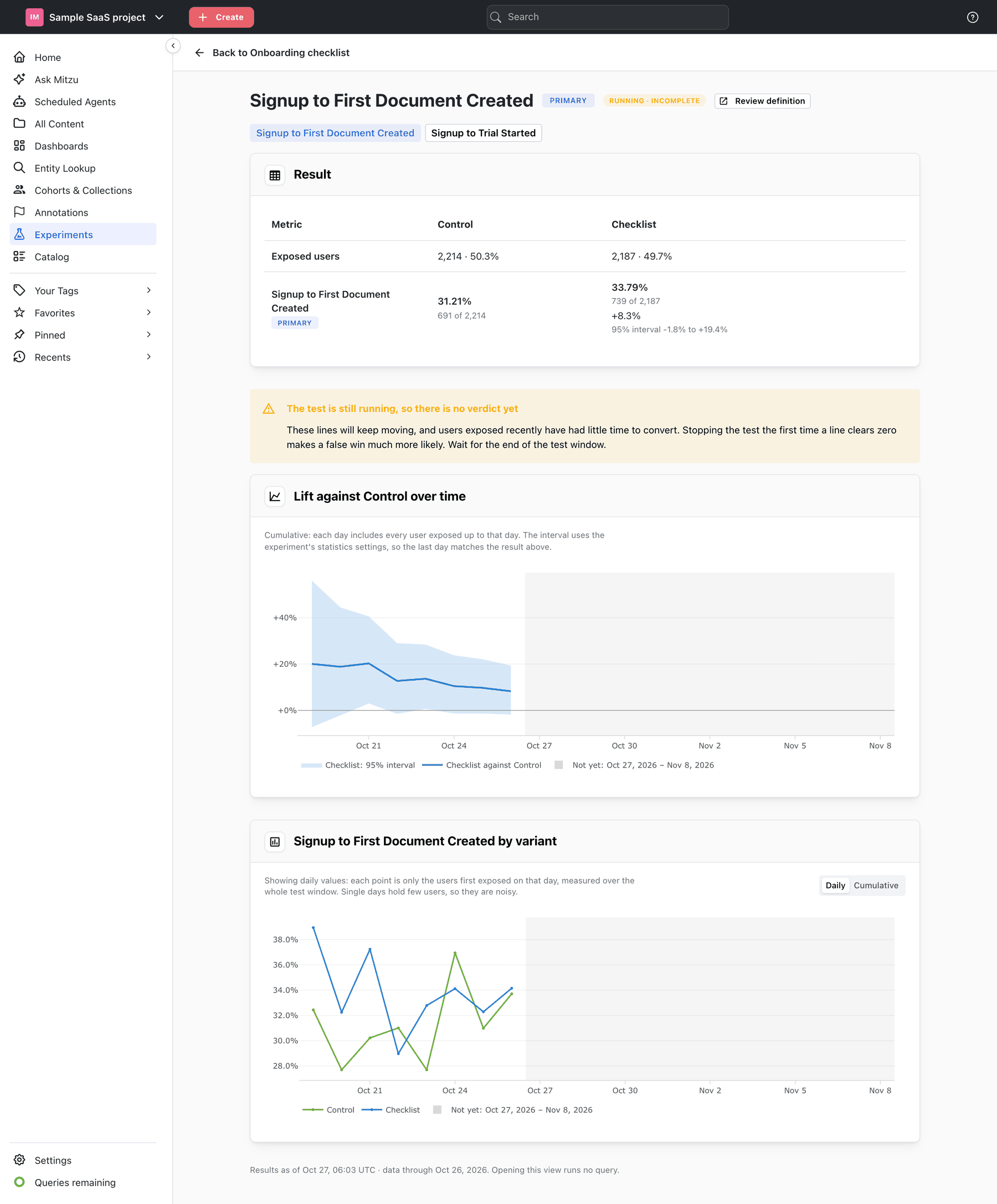
While the test window is open, the page shows a warning instead of the note:
The test is still running, so there is no verdict yet. The rest of the window is shaded and labelled
Not yet, and the most recent days include users who have had little time to convert.
When there is no view over time
| Message | What it means |
|---|---|
No results yet. Evaluate the experiment first. | The experiment has never been evaluated |
The last results run stored totals only, so there is no day-by-day view yet. Re-evaluate the experiment to see this metric over time. | The results predate day-by-day numbers |
The last results run could not compute this metric day by day, so there is no view over time. The result above is not affected. | The daily query failed; the totals are fine |
The test window is too short for a trend. The result above covers the whole window. | A one- or two-day window |
No users have been exposed to the experiment yet, so there is nothing to show over time. | No exposure in the window so far |
If some other metrics in the correction have no day-by-day numbers, the intervals before the last day are corrected against those metrics' whole-window results, and the page says so. The last day is exact.