Statistics settings
The Statistics card of the experiment form decides how the results are tested. The defaults — 95% confidence, a two-sided test and no multiple-comparison correction — suit a test with one treatment and one primary metric. Turn the correction on when you compare several variants or read secondary metrics. Change the settings only for a reason you could explain before seeing the results.
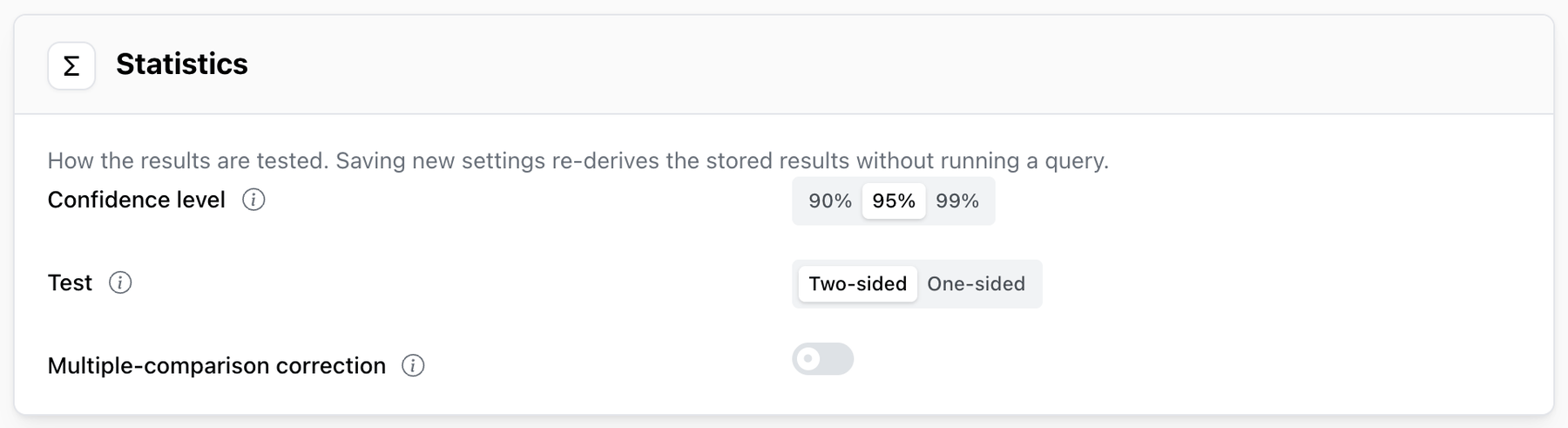
Confidence level
90%, 95% (the default) or 99%. A higher level needs stronger evidence before a difference
counts as significant, and more users to reach it.
| Level | Roughly how often an identical pair of variants still shows a "significant" difference | Use it when |
|---|---|---|
| 90% | 1 in 10 | a wrong call is cheap and easy to undo, and traffic is low |
| 95% | 1 in 20 | most product and marketing tests |
| 99% | 1 in 100 | the change is expensive or hard to reverse, such as pricing |
Test
- Two-sided (the default) looks for a difference in either direction. A variant can come out as a significant win or a significant loss.
- One-sided only looks for the change you want: the goal direction for primary and secondary
metrics, and harm for guardrails. A move the other way shows as
Not significant.
A one-sided test needs fewer users to detect the change you are looking for, but it can never tell you that a variant made things worse on the primary metric. Choose it only when a loss and no change would lead to the same decision — for example, a variant that is only rolled out if it wins.
The results show the bound a one-sided test checks instead of a full interval:
lift ≥ +2.4% at 95% confidence, one-sided on a metric that should increase, lift ≤ −1.1% at 95% confidence, one-sided on a metric where a decrease is good. A guardrail shows the bound in the
direction of harm: lift ≥ … on a guardrail that should not increase, lift ≤ … on one that should
not decrease.
Multiple-comparison correction
Off by default; turn on its switch on the Statistics card to use it. Every additional comparison — a third variant, another secondary metric — is another chance for a difference to look significant by luck. Test ten things at 95% confidence and the chance that at least one of them shows a "significant" difference by luck alone is about 40%.
With the correction on, Mitzu applies a Holm correction across every variant on the primary and secondary metrics together, so testing more of them doesn't raise the overall chance of a false win. In plain terms: each comparison needs stronger evidence the more comparisons there are. Holm sorts the comparisons from the smallest p-value up and holds the first one to the strictest bar, the next one to a slightly looser bar, and so on, stopping at the first that doesn't clear its bar. It finds every win that dividing the significance level evenly across the comparisons would find, and sometimes more. The p-values shown in the results are the corrected ones.
Guardrails are never corrected. They are there to catch harm, and a correction would make them slower to do it.
With the correction off, no correction is applied at all, not even between the variants of one metric. That is fine for a test with one treatment and a primary metric alone, where there is only one comparison. Turn it on when the test has several treatments, or when you will act on a secondary metric: otherwise each extra comparison raises the chance of a false win.
Experiments created before the correction became opt-in keep the setting they were saved with, so it stays on for them unless you change it.
Where the settings show
Under the Results card's timestamp, a line repeats the settings the results were tested with, for example:
95% confidence · two-sided test · Holm correction across 4 comparisons90% confidence · one-sided test · no multiple-comparison correction
A ? next to that line opens a short explanation of the correction and of how the results
are counted (every user exposed during the allocation window, each measured for the same number
of days after their first exposure, while funnels keep their own conversion window). It is the quickest place to point someone who asks why a p-value is higher than they
expected.
The number of comparisons is at most the number of variants other than the control, times the number of primary and secondary metrics. Comparisons that couldn't be made — a metric without enough data, or whose query failed — are not counted.
Changing the settings
The statistics settings are part of the definition: you choose them while the experiment is a draft, and they are locked once it is scheduled. To change them later, move the experiment back to draft, change them, schedule it again and evaluate: the results are computed fresh.
A finalized experiment keeps the settings it was decided with. A follow-up created with Duplicate as follow-up starts with the same settings.