Test window and scheduling
The last steps of setting up an experiment are its details, its dates, and scheduling it. The details have their own card at the top of the form; the dates sit at the top of the Population card. Scheduling is what turns a draft into a test: it locks the definition so the analysis can't change once results come in.
Details
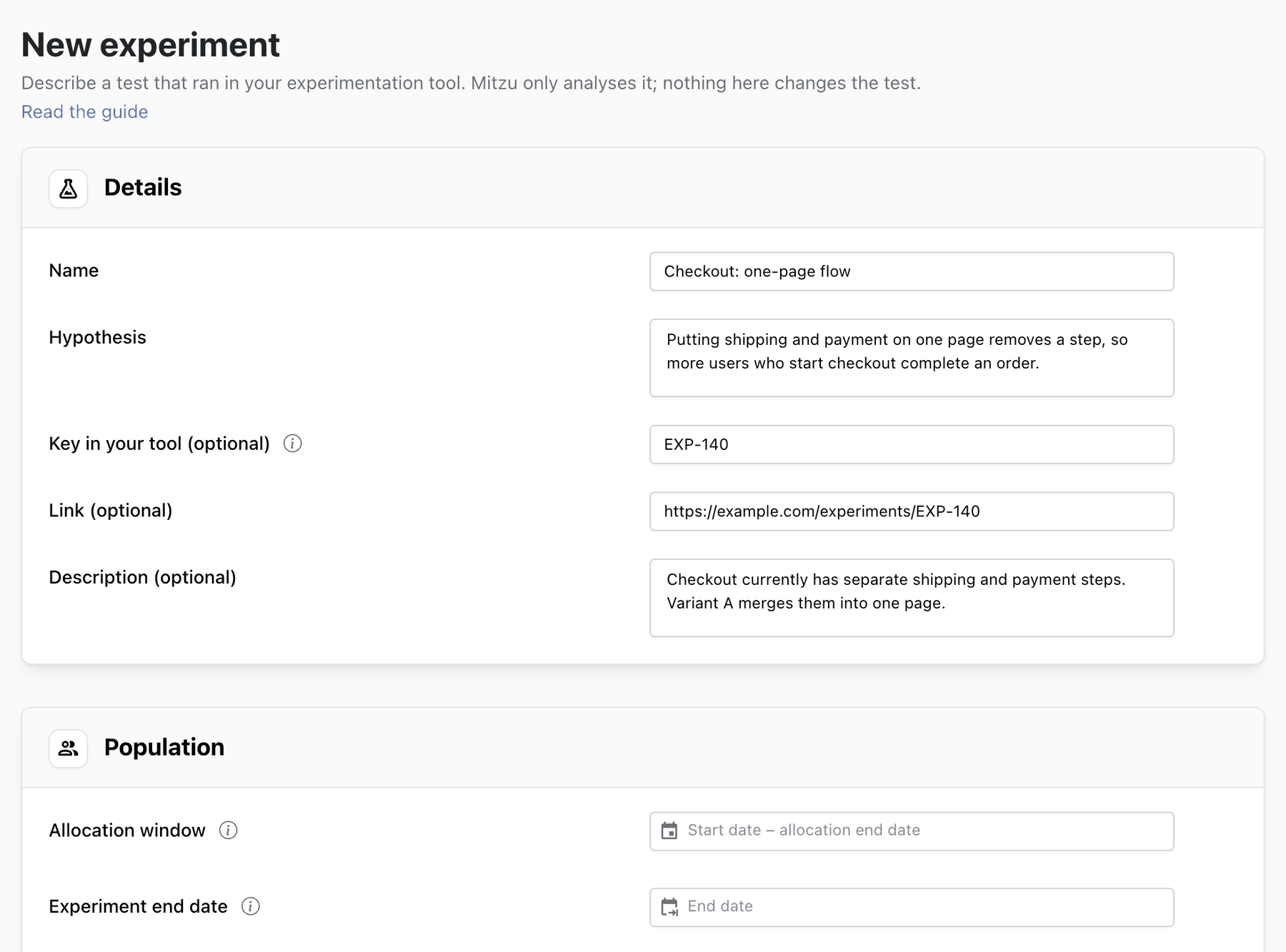
| Field | What to write |
|---|---|
| Name (required) | What is being tested, so that it reads well in a list: Homepage hero: carousel vs static banner. Up to 120 characters. |
| Hypothesis (required) | What you changed and what you expect it to do: Showing the annual plan first will raise the share of visitors who buy an annual plan, without lowering overall purchases. |
| Key in your tool | The experiment's ID in your experimentation tool, for example ABT-849, so the two can be matched. Searchable on the list. |
| Link | A full https:// link to the test in your tool, or to its brief. |
| Description | A short note shown under the name in the experiments list. |
The hypothesis is required because it is the one thing that makes a result readable months later. Write it before the test starts, with the metric and the direction you expect.
Allocation window and end date
An experiment has two date settings: when users enter it, and how long they are measured. Both are set at the top of the Population card, above the exposure event.
Allocation window. The start date and the allocation end date. Both days are included. Only users exposed between them are enrolled in the experiment; exposures before the start or after the allocation end don't count. Set it to the dates your experimentation tool was assigning users to variants.
Experiment end date. When measuring stops. It must be later than the allocation end: users who enter on the last day of allocation still get time to convert, so late enrollees are not cut short. The experiment stays incomplete until the end date has passed.
How long each user is measured. Every user gets the same number of days after their first exposure: the days from the allocation end to the end date. A user who enters on the first day of allocation is measured for as long as one who enters on the last day, so early and late enrollees are compared fairly and nobody is measured past the end date. This applies to unique-user, event-count and sum metrics; a funnel keeps its own conversion window.
For example, a test that assigns users from Oct 1 to Oct 14 and measures a 7-day conversion would use
the allocation window Oct 1, 2026 – Oct 14, 2026 and the end date Oct 21, 2026. The experiment
page shows it as Oct 1, 2026 – Oct 21, 2026 (allocation ends Oct 14, 2026), and every user is
measured for 7 days after their first exposure.

If you are analysing a test that already finished, use its real allocation dates and an end date that leaves time for the metrics; the experiment goes straight to running once scheduled, and to ready for decision after its first evaluation that covers the end date.
Experiments created before the split. Experiments that had a single test window keep working as before: their allocation ends on their end date, each user is measured for as many days as the window is long, and their results don't change. If you move one back to draft and edit it, the form shows its old end date as the allocation end; pick an experiment end date after it before saving.
How days are counted. The allocation window and end date run from midnight to midnight in your workspace's time zone, like every other date range in Mitzu. "Today" — which decides when the test counts as started, ended and fully covered — follows the UTC date. The results only count as covering a day once that day is over, so a test whose last day is today becomes ready for decision when you evaluate it tomorrow.
Choosing the length.
- Allocate whole weeks. Many products behave differently on weekdays and weekends; a 10-day allocation counts two Mondays and one Sunday.
- Run at least as long as the sample plan needs.
- Leave room for the metric to happen. The gap between the allocation end and the end date is how long every user is measured, and a funnel with a 7-day conversion window can't measure users exposed on the last day of allocation until a week later. Set the end date at least as far after the allocation end as your longest conversion window.
Saving
Click Create experiment (or Save changes on an existing one). If anything is missing, one notification lists all of it:
- a name and a hypothesis;
- both dates of the allocation window, the allocation end not before the start;
- an experiment end date, later than the allocation end;
- an exposure event and a variant property;
- a primary metric;
- once the test window has started: 2 to 10 variants and a control.
Before the test window starts there is no exposure to list variants from, so a future experiment saves without them. See Population and variants.
Scheduling
Click Schedule experiment on the experiment page. Mitzu checks that the experiment has a population, a primary metric, the allocation window and the end date, then:
- the population, metrics, statistics settings, sample plan, variants, allocation window and end date are locked;
- the experiment becomes Scheduled if its allocation starts in the future, or Running if it has already started.
Experiment scheduled. Its population, metrics, statistics and test window are now locked.
Nothing is queried when you schedule. Compute the first results with Evaluate once the allocation has begun. After the end date has passed, Mitzu also evaluates the experiment once on its own and emails you the result; see Evaluating an experiment.
When the test changes in your tool
Tests get extended, cut short or restarted. Mitzu doesn't see that on its own:
- Extended or cut short. Click Back to draft, change the allocation end and the end date, schedule again and evaluate. The results computed before are no longer shown.
- Restarted with a fix. Treat it as a new test: create a new experiment for the new window, so users from the broken period don't mix in. Archive the old one with a note.
- Ramped up. If the share sent to each variant changed during the test — a 90/10 start ramped to 50/50 — the overall split matches neither, and the Traffic split check will flag it. Users who arrived early and late can also behave differently, which biases the comparison. Start the allocation window on the day the final split took effect.