Finalizing
A test isn't finished when the numbers come in; it is finished when someone decides what to do about them. Finalizing records that decision on the experiment — the outcome, what you will do and why — and freezes the results it was based on.
When you can finalize
Finalize appears in the page header once the experiment is Ready for decision: the test window has ended and the results cover all of it. If an evaluation is running, wait for it to finish, so the decision is based on the final results.
Recording the decision
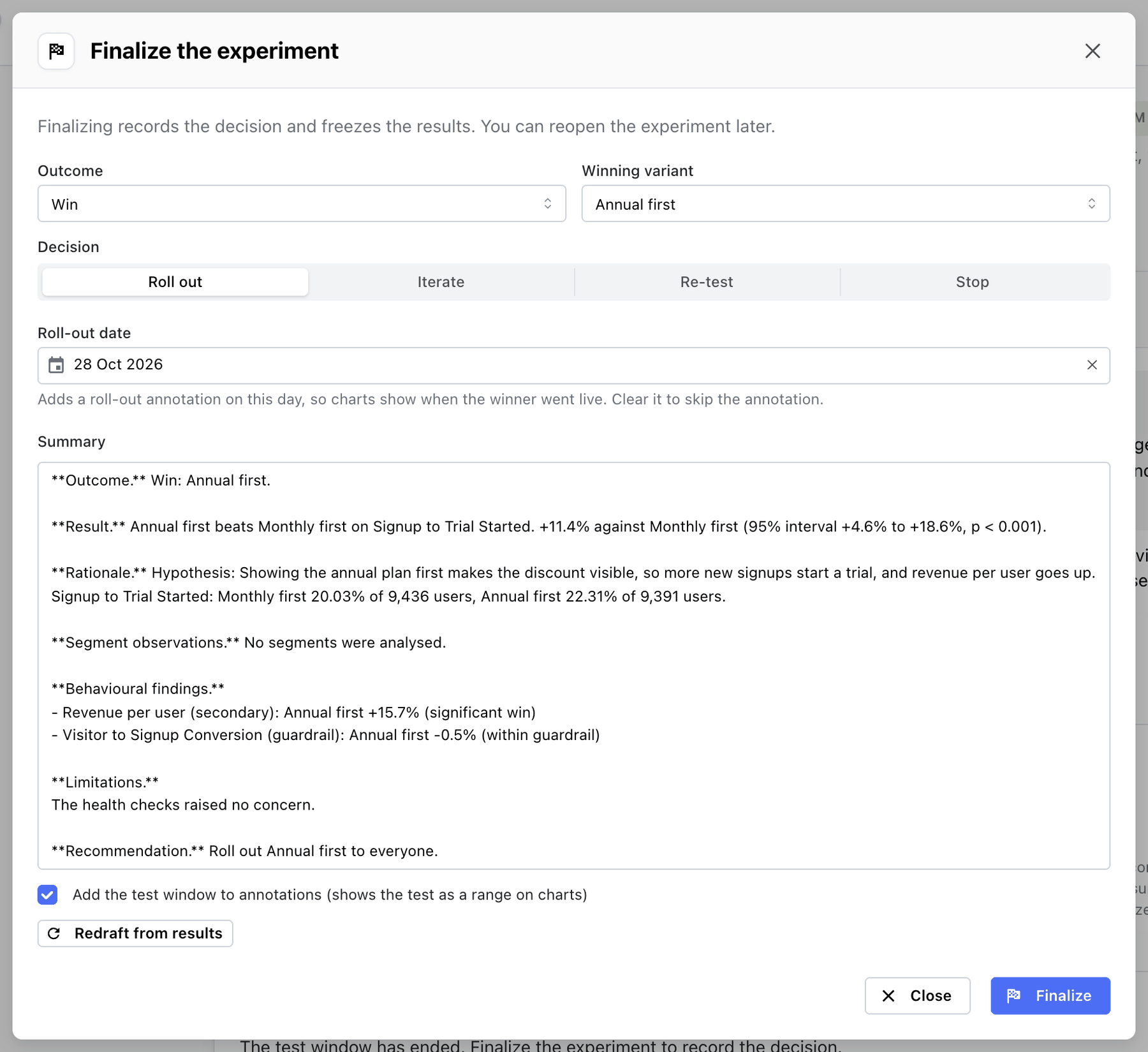
Click Finalize and fill in the form:
| Field | Options |
|---|---|
| Outcome | Win, Loss, No clear winner, Inconclusive |
| Winning variant | Only for a win: the variant that won |
| Decision | Roll out, Iterate, Re-test, Stop |
| Roll-out date | Only for Roll out: the day the change went live, today by default |
| Summary | What happened and why you decided this way |
The form opens with the outcome, winning variant and decision Mitzu suggests from the results (see
the table below). They are suggestions: the decision is yours, and it doesn't have to match the
verdict. A significant win on a metric that turned out to be the wrong one can be recorded as
Inconclusive.
The summary is drafted from the results, in sections you can edit:
- Outcome — the outcome you picked.
- Result — the verdict's headline and sentence.
- Rationale — the hypothesis and each variant's value on the primary metric.
- Segment observations —
No segments were analysed.; results by segment aren't available yet. - Behavioural findings — each secondary metric and guardrail, with every variant's lift and outcome.
- Limitations — every health check that warned or failed.
- Recommendation — a sentence for the decision, for example
Roll out Short form to everyone.
Add the context only you have: why the test was run, what else was going on, what happens next. Markdown is supported. Redraft from results replaces your edits with a fresh draft, for example after you change the outcome.
Roll-out date appears when the decision is Roll out and starts on today. On finalize it adds a
roll-out annotation on that day, named after the winner, so every chart shows when the change went
live. Set it to the day the winner reached everyone in your tool, or clear it to skip the annotation.
Add the test window to annotations, ticked by default, marks the test as a date range on every chart in the workspace. See Follow-ups.
Click Finalize. Experiment finalized. The results are frozen.
What finalizing does
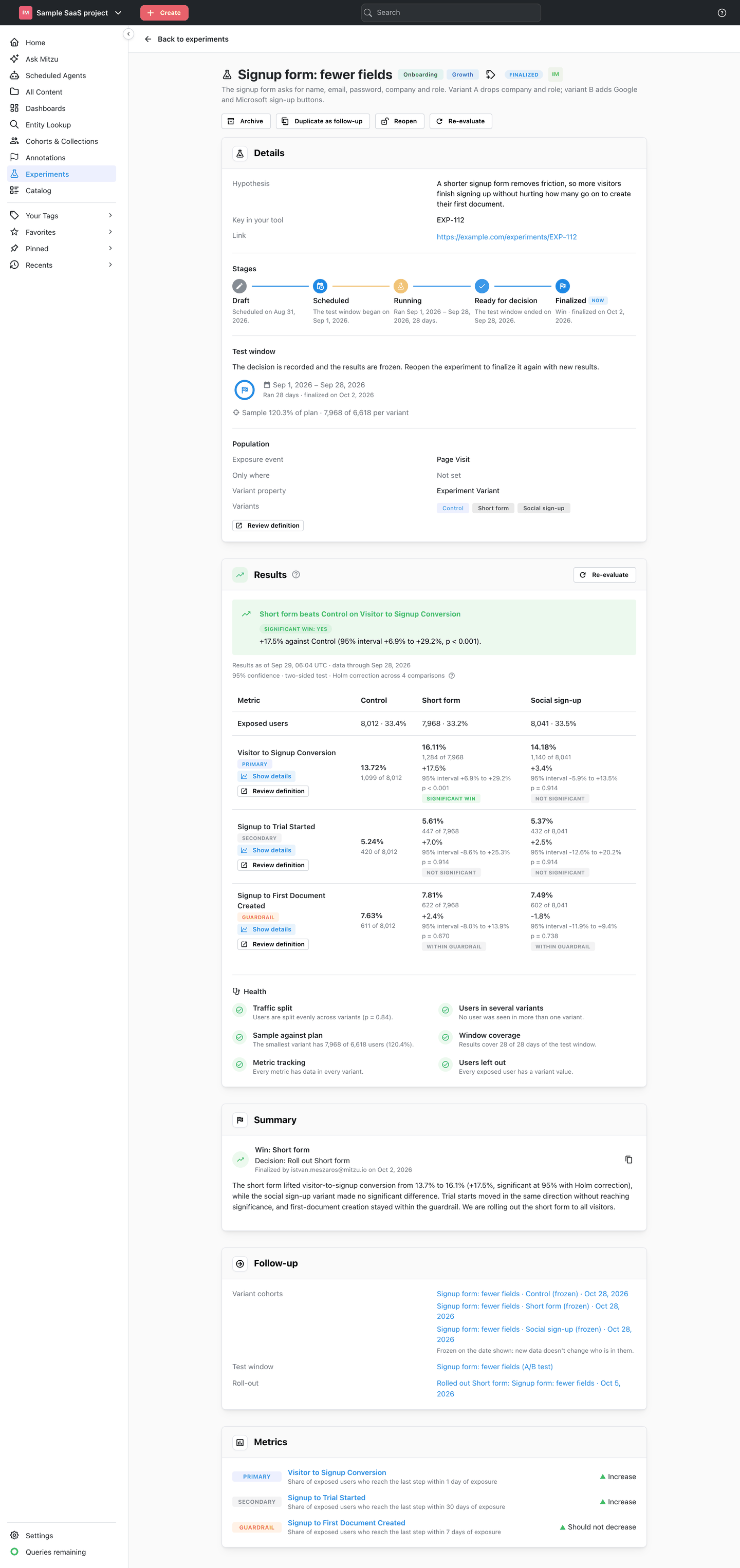
- The experiment becomes Finalized.
- The results shown are frozen: later evaluations never replace them.
- A Summary card shows the outcome, for example
Win: Short form, the decision, for exampleDecision: Roll out Short form, and your summary, with a button to copy it. - A Follow-up card appears, for saving variant cohorts and adding annotations.
- Duplicate as follow-up, Reopen and Re-evaluate appear in the page header.
- The experiment can no longer be edited.
Choosing the outcome and decision
What Mitzu suggests for each verdict, and when you might choose otherwise:
| Results | Suggested outcome | Suggested decision | Consider instead |
|---|---|---|---|
| Significant win, guardrails within limits | Win | Roll out | |
| Significant win, a guardrail breached | Win | Iterate | Roll out if the harm is small and understood |
| Significant loss | Loss | Stop | Iterate if the idea is still worth a better version |
| No clear winner | No clear winner | Stop | Roll out if the variant is cheaper or simpler to maintain |
| Inconclusive: sample too small, or too few users to compare | Inconclusive | Re-test | Stop if the lift you could detect isn't worth a longer test |
| Verdict withheld | Inconclusive | Re-test | Fix the assignment first |
"No clear winner" is a result, not a failure: with a sample plan reached, it says the change doesn't move the metric by the lift you cared about. That is worth knowing and worth recording.
Writing a useful summary
A summary is read months later by someone who wasn't there. Cover:
- What was tested and why — one sentence, from the hypothesis.
- What happened — the verdict on the primary metric with the lift and interval, and anything notable on the secondary metrics and guardrails.
- What you decided and why — including what the numbers alone don't say: cost, risk, strategy.
- What happens next — the roll-out date, the follow-up test, the open question.