Health checks
A verdict is only as good as the test behind it. Health checks look for problems in the test itself — how users were assigned, whether the sample is big enough, whether every metric was measured — and appear under a divider at the bottom of the Results card after every evaluation.
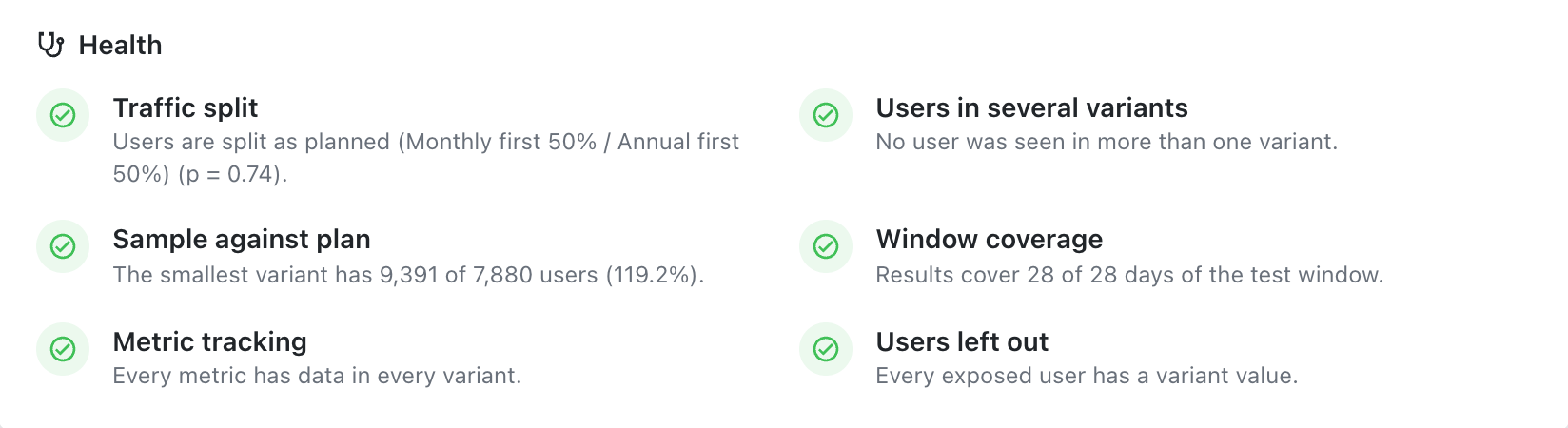
Each check is one of four states:
| State | Icon | Meaning |
|---|---|---|
| Pass | green check | Nothing to worry about |
| Warning | yellow | Worth a look; the verdict stands |
| Fail | red cross | A real problem. On the two assignment checks, the verdict is withheld |
| Unknown | grey | Not enough to check yet, for example before the primary metric has results |
The checks
Traffic split
Compares how many users each variant got with how many it should have got. Users are counted on the primary metric.
- No planned split. Mitzu expects an even split.
Users are split evenly across variants (p = 0.42).passes. A clearly uneven split is a warning —Set the planned split if the test was set up with an unequal split; otherwise check the assignment.— unless a sample plan is set, which assumes an even split: then it fails and the verdict is withheld. - With a planned split. Mitzu compares the real split with the plan, for example
Users are split as planned (Control 50% / A 25% / B 25%) (p = 0.61).A clear mismatch fails and the verdict is withheld. - A variant in the planned split that no exposed user has fails the check. A variant in the data that isn't in the planned split is a warning.
"Clearly" means a chi-square test with p < 0.001: with thousands of users, even a 51/49 split can fail, and that is intended. A real assignment never drifts that far by chance.
Why it matters. An uneven split — often called a sample ratio mismatch — almost always means something removed users from one variant: a redirect that loses some visitors, a bug that crashes the new page for one browser, exposure logged only after the new page loads. The users who remain are no longer comparable, and no statistics can fix that.
What to do. Check that the planned split in Mitzu is the split configured in your tool. If it is, look for where the variants differ in what gets logged: exposure fired at different moments, filtered bots, users who left before the variant loaded.
Users in several variants
Counts users who were exposed to more than one variant. They are counted in every variant they saw.
No user was seen in more than one variant.passes.- Otherwise, for example:
9,210 users were counted 10,940 times: users seen in more than one variant count in each (15.8% of the counts).The percentage is the extra counts — 1,730 here — as a share of all counts. Above 5% the check fails and the verdict is withheld.
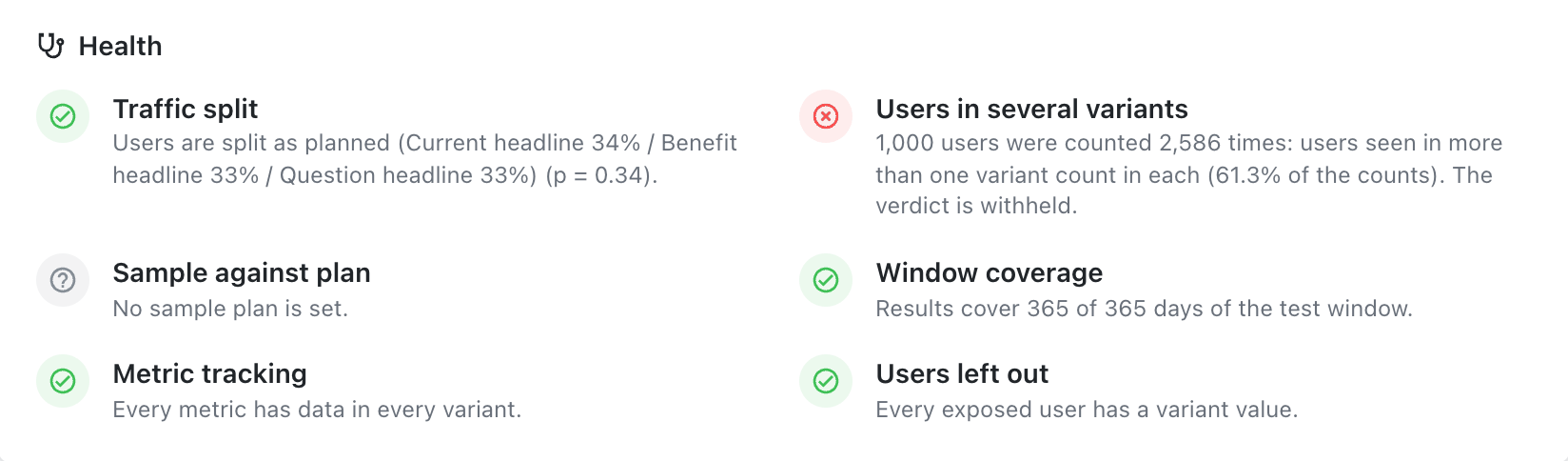
Why it matters. A user who saw both versions is in both groups, so the groups are no longer independent, and the difference between them shrinks towards zero.
What to do. Check the assignment in your experimentation tool: is it sticky per user, or per device or session? Does the exposure event use the same user identifier as the assignment? If one event carries several tests, does the "Only where" filter select only this one?
Sample against plan
Compares the smallest variant with the sample plan:
The smallest variant has 3,210 of 5,000 users (64.2%). It passes once every variant has reached
the plan, and shows No sample plan is set. when there is none.
Window coverage
Results cover 21 of 21 days of the test window. A warning while the results don't reach the end of
the window, which is normal for a running test.
Metric tracking
Every metric has data in every variant. passes. A metric with no conversions in a variant is a
warning, for example Checkout to purchase: no conversions in B. A metric whose query failed is a
fail, with the error.
Why it matters. A variant with zero conversions is usually a tracking gap, not a result: the new page doesn't send the event, or sends it under another name.
Users left out
Every exposed user has a variant value. passes. Otherwise a warning:
412 exposed users (1.2%) have no variant value and are left out.
Why it matters. A few users without a variant are harmless. Many usually mean the variant property is missing on some platform or app version, and those users might behave differently from the rest.
When the verdict is withheld
Only the two assignment checks — Traffic split and Users in several variants — can withhold the verdict. The Results card then shows:
Verdict withheld: users were seen in several variants Many users were exposed to more than one variant, so the variants are not independent groups and the comparison is not trustworthy. Check the assignment in your experimentation tool.
or Verdict withheld: the traffic split is uneven. The numbers stay visible, without p-values or
outcome badges.
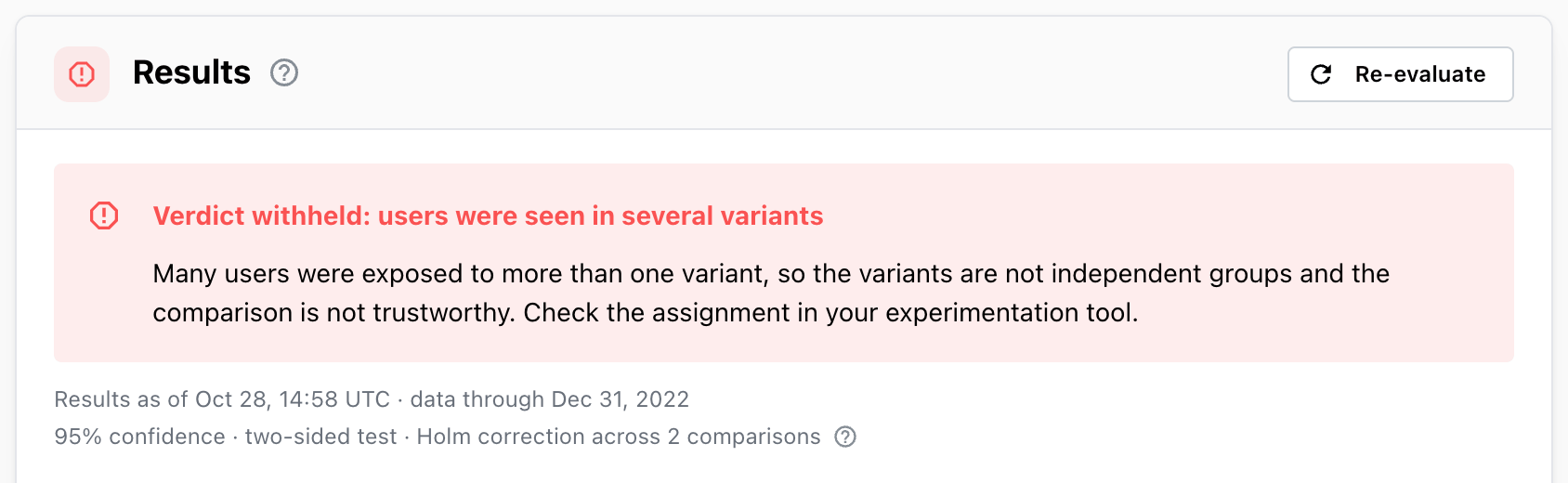
A withheld verdict can't be fixed in Mitzu by changing settings; the test has to be fixed and usually
run again. You can still finalize it with the outcome Inconclusive and the decision Re-test, so the
problem is on record.