Results and verdicts
The Results card is where an experiment answers its question. At the top is the verdict: whether a variant beats the control on the primary metric. Below it, the results table shows every metric for every variant, and under a divider the health checks say whether the test itself can be trusted.
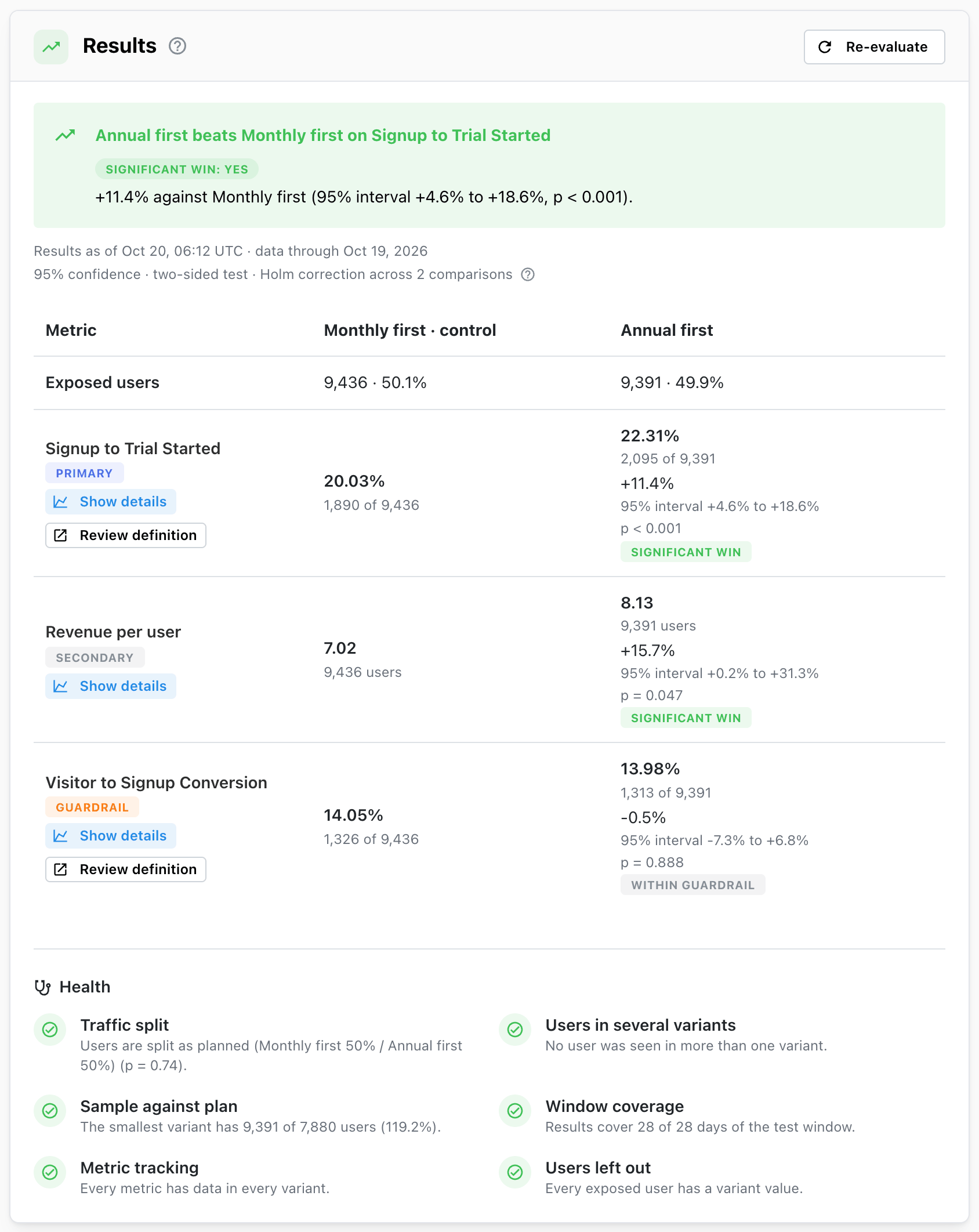
The card header
- The verdict icon on the left takes the colour of the result category. Hover it to read the
category, for example
Significant win: Annual first. - Evaluate / Re-evaluate on the right computes new results. See Evaluating an experiment.
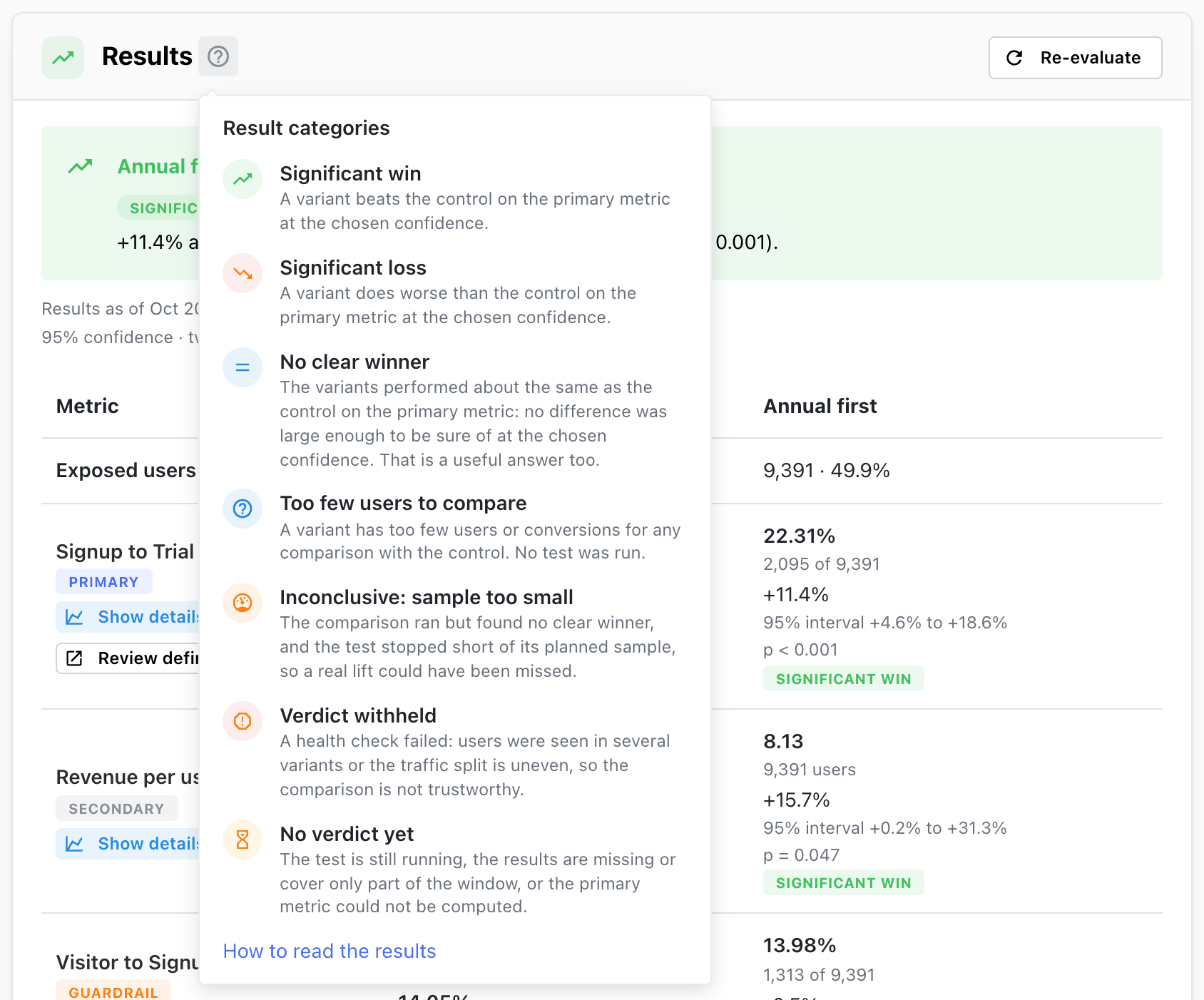
?opens the list of result categories with their icons and meaning.
The verdict
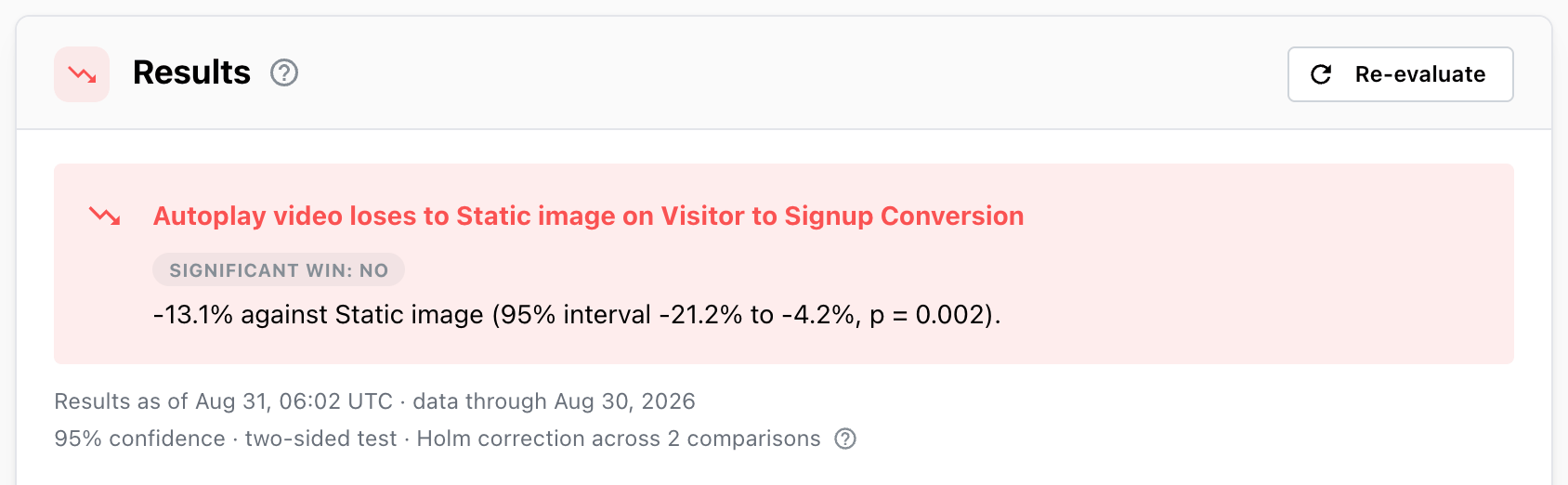
The verdict is a title and one sentence about the primary metric. On a significant result it names the leading variant, the lift, its interval and the p-value:
Annual first beats Monthly first on Signup to Trial Started +11.4% against Monthly first (95% interval +4.6% to +18.6%, p < 0.001).
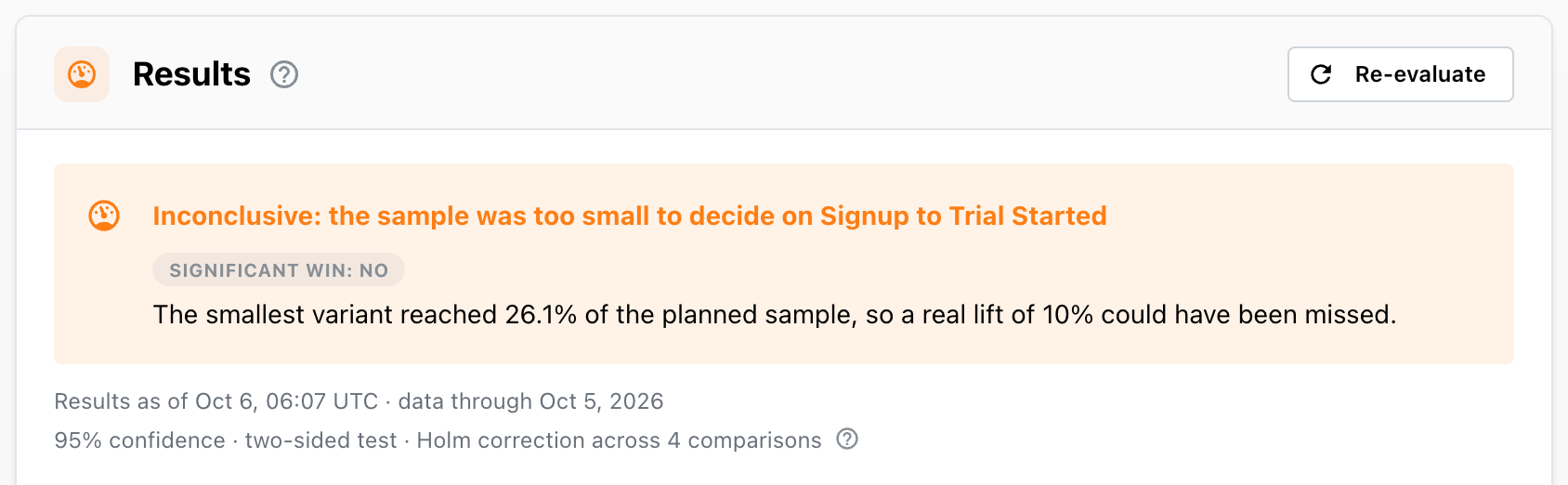
Under the headline, a badge answers the question most readers ask first: Significant win: yes
when a variant beats the control on the primary metric, and Significant win: no for every other
verdict — a loss, no clear winner or a sample too small. There is no badge while the experiment is
still running, before the first results, when there are too few users to compare, or while the
verdict is withheld.
Under the verdict, Results as of … · data through … says when the results were computed, and the
next line repeats the statistics settings they were tested with,
for example 95% confidence · two-sided test · Holm correction across 2 comparisons. The ?
next to it explains the multiple-comparison correction — off by default, turned on under
Statistics when editing the experiment — and that the results are cumulative: every user exposed
during the allocation window, each measured for the same number of days after their first exposure
(funnels keep their own conversion window). Without the correction the line reads no multiple-comparison correction; with several variants or secondary metrics, consider
turning it on before the test starts.
Verdicts
| Category | Colour | Significant win badge | What it means |
|---|---|---|---|
| Significant win | green | yes | A variant beats the control on the primary metric at the chosen confidence. |
| Significant loss | red | no | A variant does worse than the control on the primary metric at the chosen confidence. |
| No clear winner | blue | no | The variants performed about the same as the control: no difference was large enough to be sure of at the chosen confidence. That is a useful answer too. |
| Too few users to compare | blue | none | A variant has too few users or conversions for any comparison with the control. No test was run. |
| Inconclusive: sample too small | orange | no | The comparison found no clear winner (or had too few users), and the test stopped short of its planned sample, so a real lift could have been missed. |
| Verdict withheld | red | none | A health check failed: users were seen in several variants or the traffic split is uneven, so the comparison is not trustworthy. |
| No verdict yet | yellow | none | The test is still running, the results are missing or cover only part of the window, or the primary metric could not be computed. |
These categories were renamed in October 2026: No clear winner was No significant difference,
Too few users to compare was Not enough data, and Inconclusive: sample too small was
Underpowered. The meaning of each is unchanged.
With several variants. If more than one variant beats the control, the verdict names the one with
the largest lift. If none wins but some lose, it names the one with the largest loss. A win always
takes precedence over a loss: a test where B wins and C loses reads Significant win: B, and C's loss
is in the table.
Guardrails don't change the verdict. A breached guardrail is shown in red on its row, and on the
experiments list the result popover adds Guardrail breached next to the verdict. Whether a win with a breached guardrail is still
worth rolling out is your call when you finalize.
The headlines you can see
| Headline | When |
|---|---|
<variant> beats <control> on <metric> | Significant win |
<variant> loses to <control> on <metric> | Significant loss |
No clear winner on <metric> | No variant differs clearly from the control |
Too few users to decide on <metric> | Every variant needs 100 users and 5 conversions (or 5 users with a value) |
Inconclusive: the sample was too small to decide on <metric> | No clear winner or too few users, and the smallest variant is short of the sample plan |
Verdict withheld: users were seen in several variants | Extra counts from users in more than one variant are over 5% of all counts |
Verdict withheld: the traffic split is uneven | The split differs clearly from the plan |
Incomplete: no verdict yet | The test window hasn't ended |
The test window has ended | The window ended but the results don't cover its last day; re-evaluate |
No results yet | The experiment has never been evaluated |
No verdict: the primary metric has no results | The primary metric's query failed |
The results table
The table has one column per variant, with the control first and marked · control, and one row per
metric. The first row, Exposed users, counts the users
in each variant.
Each cell of a metric row shows, from top to bottom:
| Line | Example | What it is |
|---|---|---|
| Value | 22.31% or 8.13 | The variant's rate, or its per-user value |
| Volume | 2,095 of 9,391 or 9,391 users | Converted users of exposed users, or exposed users |
| Lift | +11.4% | The relative difference from the control (not on the control's column) |
| Interval | 95% interval +4.6% to +18.6% | The range of lifts consistent with the data |
| p-value | p = 0.004 | How surprising the difference would be if the variants were the same. After the correction, when it is on |
| Outcome | Significant win | The result of the test for this variant and metric |
The outcome badge is one of Significant win, Significant loss and Not significant, or on a
guardrail Within guardrail and Guardrail breached.
Under each metric's name are its role badge (Primary, Secondary, Guardrail), any note — such as
why the metric has no results — and two buttons:
- Show details opens the metric over time. See Metric details over time. Clicking the metric's name does the same.
- Review definition opens, in a new tab, the funnel Mitzu measured for this metric: the exposure step followed by the insight's steps, broken down by variant, over the test window. Offered on conversion metrics.
Reading lift and interval together
The lift is the best estimate; the interval is how far off it could plausibly be.
+11.4%with95% interval +4.6% to +18.6%— a real improvement, somewhere between modest and large.+3.0%with95% interval −4.5% to +11.0%— could be a gain, could be a loss; not significant.+0.4%with95% interval −0.6% to +1.4%— not significant, and any real effect is small. With a big enough sample, this is a confident "no meaningful difference".
The interval is for the relative lift. On conversion metrics it is not symmetric around the lift: a rate can't fall below zero, so the interval stretches further upwards than downwards.
With a one-sided test the cell shows only the bound that is tested, for example
lift ≥ +2.4% at 95% confidence, one-sided.
When a variant has too little data
A metric is compared only when every variant has at least 100 exposed users and 5 conversions
(or 5 users with a value, for per-user metrics). Until then the row says:
Too few users for a comparison yet: every variant needs 100 users and 5 conversions.
These are minimums for the arithmetic to be valid, not targets. A useful test usually needs far more; see Sample plan.
Running experiments
While the test window is open the table fills in as you evaluate, but the verdict reads
Incomplete: no verdict yet with:
The results do not cover the whole test window yet, so the numbers below will move. Acting on them now makes a false win much more likely.
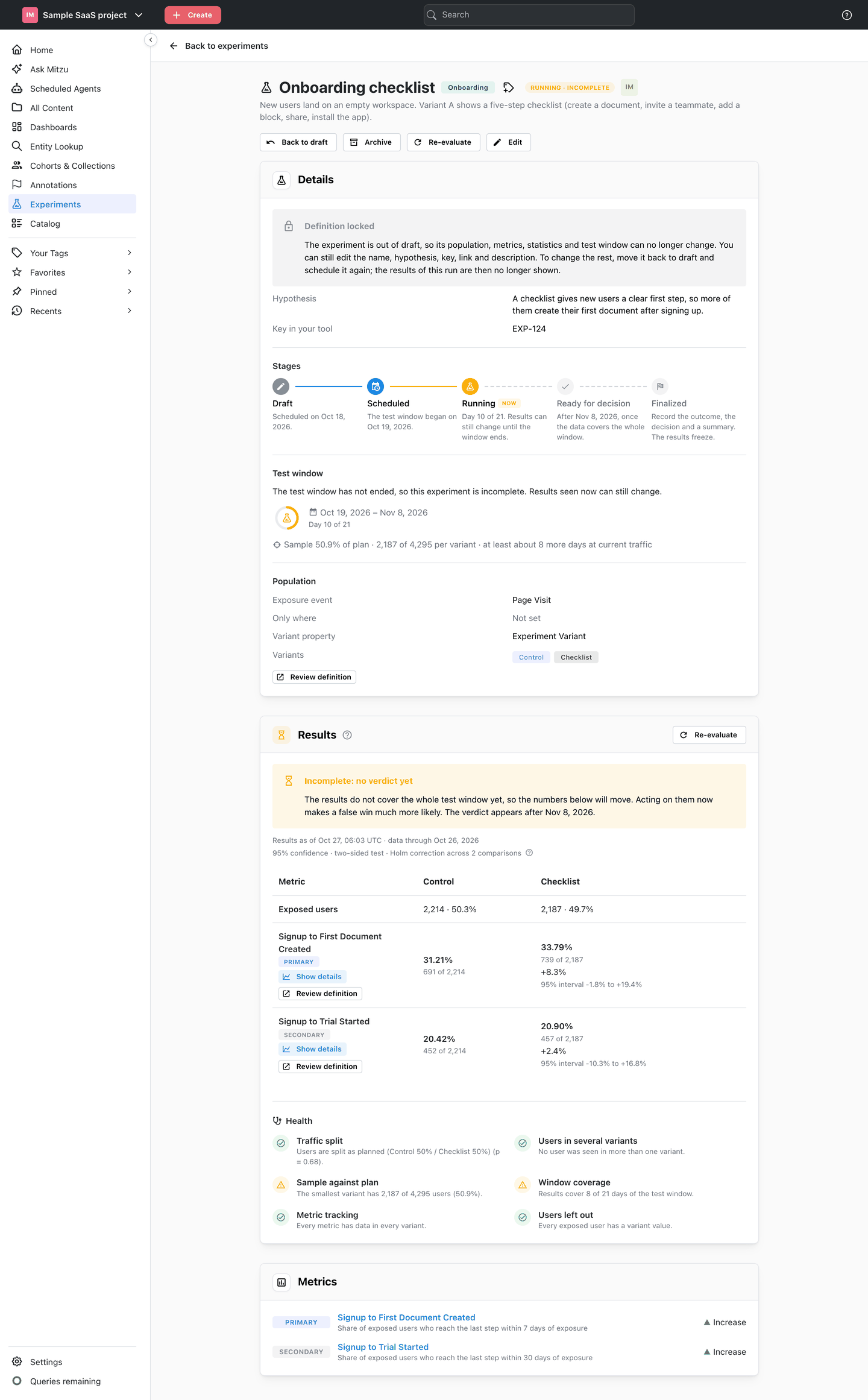
Cells show each variant's value, lift and interval, but no p-value and no outcome badge: those appear once the experiment is ready for decision. The same holds while a verdict is withheld. See Why not stop a test early?