Performance settings
The Performance settings tab speeds up funnels, retention, and journey insights on high-volume projects by reducing how many events and entities Mitzu processes — and by applying query-friendly defaults to new charts.
Use this tab when insights run slowly, your warehouse is under load, or you routinely hit query time limits. Changes apply workspace-wide and are saved automatically.
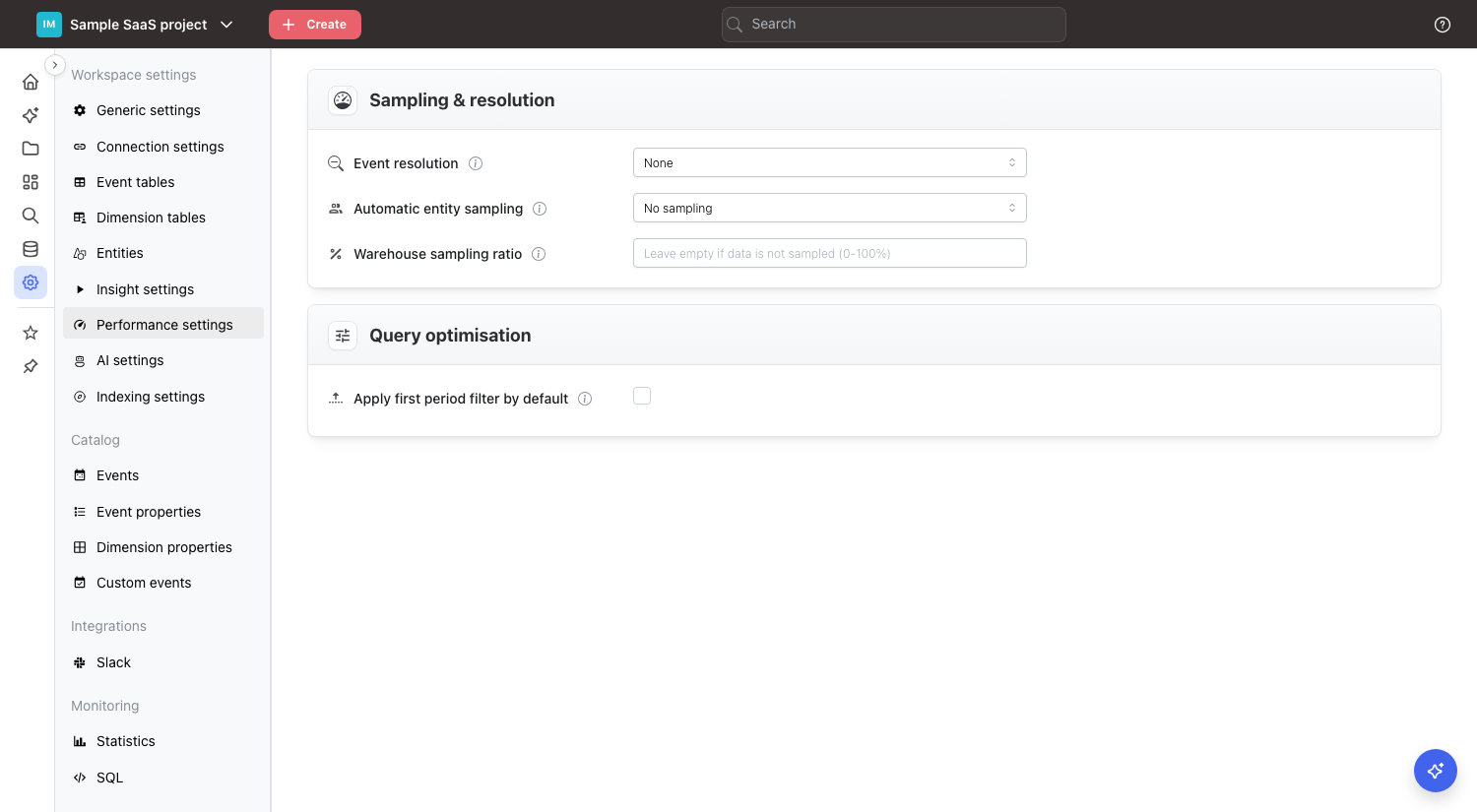
Sampling & resolution
Mitzu has two independent kinds of sampling. They reduce different things, they are scaled back up differently, and each has its own workspace default. A third setting, Apply entity sampling to, decides which insight types the entity sampling default reaches.
Event sampling (Event resolution) | Entity sampling (Uniques sampling) | |
|---|---|---|
| What it drops | Events — keeps at most one event per entity per time bucket | Entities — keeps a fixed share of users / accounts / sessions |
| Who is still counted | Every entity | Only the entities in the sample |
| Correction applied | None needed — entity counts are unaffected | Counts are multiplied back up to full-population estimates |
| Workspace default setting | Event resolution | Automatic entity sampling, narrowed by Apply entity sampling to |
| Per-insight control | Event resolution in the sampling menu | Uniques sampling in the sampling menu |
| Applies to | Funnels, journeys, retention | All insight types, segmentation included — Apply entity sampling to can keep the workspace default off segmentations |
Event resolution and Automatic entity sampling are aggressiveness scales, not concrete values. They take four levels — None, Weak, Medium, Strong — and Mitzu turns the level into a concrete setting on each insight. The two scales are set separately, so you can run Strong event resolution with None entity sampling, or any other combination.
Event resolution
Groups high-frequency events into a single event per entity per hour or per day. Funnels, journeys, and retention then read far fewer rows and calculate faster. Every entity is still in the result — you only lose sub-hour or sub-day granularity on the event stream, which shows up in time-based measures such as time to convert.
The level you choose here does not pick a resolution directly. It decides how long a time span has to be before Mitzu compresses the event stream by itself:
| Insight type | Measured against | None | Weak | Medium | Strong |
|---|---|---|---|---|---|
| Funnel, Journey | The conversion window | never | ≥ 60 days | ≥ 30 days | ≥ 15 days |
| Retention | The chart's date range | never | ≥ 180 days | ≥ 90 days | ≥ 45 days |
| Segmentation | — | never | never | never | never |
The check runs when you switch the metric type on Explore: if the span has reached the threshold at that moment, the insight's Event resolution is set to One user event per hour, otherwise it is set to No sampling. Widening the date range or conversion window afterwards does not re-run it.
Automatic selection only ever reaches One user event per hour. One user event per minute and One user event per day exist in the per-insight menu but are never chosen for you — pick them by hand when you want them.
Months and years are converted with approximate lengths (1 month = 30 days, 1 year = 365 days), so a 2-month conversion window counts as 60 days.
When to use it:
- Entities generate many events of the same type in a short time (scroll, heartbeat, tick events).
- You don't need to distinguish "5 pageviews in a minute" from "1 pageview" in your funnel logic.
Automatic entity sampling
Samples entities — users, sessions, accounts, or whatever the workspace's default entity is. Mitzu keeps a fixed share of them and multiplies the resulting counts back up, so the numbers you read approximate the full population. Whether segmentations pick it up is decided by Apply entity sampling to.
The level maps straight to a share of entities:
| Level | Dropdown label | Entities kept |
|---|---|---|
None | No sampling | 100% — no sampling |
Weak | 50% volume reduction | 50% |
Medium | 75% volume reduction | 25% |
Strong | 90% volume reduction | 10% |
Trade-off: faster queries at the cost of precision. Small segments can disappear entirely at aggressive rates, and rare-event funnels get noisy.
Recommended starting point on large warehouses: try Weak (50% volume reduction) first and compare against a non-sampled baseline. Only go further if the speed-up justifies the precision loss.
Unlike the event resolution scale, this setting has no time thresholds. Weak, Medium, and Strong apply to an insight the moment it is seeded, regardless of how long a period it covers.
Apply entity sampling to
Decides which insight types the Automatic entity sampling level above reaches. It has no effect while that level is None. Every workspace starts on Funnels, retention and journeys only, including workspaces that existed before this setting was added.
| Option | Behaviour |
|---|---|
| Every insight type | Segmentations, funnels, retention and journeys all start out sampled. |
| Funnels, retention and journeys only | Multi-step insights start out sampled; segmentations are left unsampled, so counts stay exact. This is the default. |
Segmentations are usually a single scan over the event table, so they are cheap enough to run at full volume even on large warehouses. Funnels, retention and journeys join events to themselves and are where sampling pays off. Pick Funnels, retention and journeys only when you want exact numbers in your day-to-day segmentation charts without giving up the speed-up on the expensive insight types.
The option also changes what switching the metric type on Explore does to Uniques sampling:
- Every insight type — a rate you picked by hand survives the switch. Only
No samplingis re-seeded with the workspace level. - Funnels, retention and journeys only — the switch clears the current rate, whatever it is, and applies the default for the new type: the workspace level for a funnel, retention or journey,
No samplingfor a segmentation. Switching a funnel to a segmentation turns sampling off, and switching back turns it on again.
You can still turn sampling on by hand for a single segmentation from the sampling menu above the chart. That choice holds through date-range and filter changes, until you switch the metric type.
Changing this setting does not rewrite existing insights. A saved insight keeps the rate it was saved with, and a segmentation that was seeded while the option was Every insight type keeps its rate until you switch its metric type.
Segmentations created by the AI agent are never entity-sampled, whichever option you pick here. The agent applies the workspace level only to the funnels, retention and journeys it builds.
Warehouse sampling ratio
An unrelated knob. Use it only when your warehouse already holds a pre-sampled subset of production events — for example a pipeline that writes 1 of every 5 events for cost reasons. It tells Mitzu what percentage of source events actually reached the warehouse so final counts can be reconstructed.
- Enter a value between
0and100(percent). - Mitzu multiplies every scaled count by
100 / valuein the supported final aggregations. - Example: the warehouse holds 20% of events → set to
20→ Mitzu multiplies counts by5. - Leave empty when the data is not pre-sampled. Most workspaces should leave this empty.
The multiplier stacks with entity sampling: an insight at 90% volume reduction in a workspace with a warehouse sampling ratio of 20 has its counts multiplied by 10 × 5 = 50.
Unlike Automatic entity sampling, this setting does not add sampling to the queries Mitzu generates. It compensates for sampling that already happened upstream.
How the defaults are applied
This is the part that surprises people, because the two sampling types behave differently once an insight exists. The short version:
- Entity sampling fills a gap. It is only written into an insight whose
Uniques samplingisNo sampling, so a rate you picked by hand is kept. The one exception is a metric-type switch whileAutomatic entity samplingis notNoneandApply entity sampling toisFunnels, retention and journeys only, which clears the rate and applies the default for the new type. - Event resolution is recomputed. Whenever it is evaluated it replaces whatever is in the insight's
Event resolution— including a value you picked by hand.
When each default is written
| Moment | Uniques sampling | Event resolution |
|---|---|---|
You create a new insight from the + menu | Seeded from Automatic entity sampling | Left at No sampling |
| You switch the metric type on Explore (funnel ↔ retention ↔ journey ↔ segmentation) | Re-seeded only if currently No sampling — under Funnels, retention and journeys only, cleared and re-seeded | Recomputed and overwritten |
| You switch the metric type on an entity profile (Explore opened for a single entity) | Set to No sampling, unless a rate you picked by hand survives the switch | Set to No sampling |
| You change anything else on Explore (date range, conversion / retention window, segments, filters, breakdown, chart type, aggregation…) | Untouched | Untouched |
| You open a saved insight, a shared link, or a dashboard card | Untouched — the saved value is used as-is | Untouched — the saved value is used as-is |
| The AI agent creates a funnel, journey, or retention insight | Seeded from Automatic entity sampling | Computed from Event resolution |
| The AI agent creates a segmentation | Untouched | Untouched |
When Apply entity sampling to is Funnels, retention and journeys only, "seeded" means No sampling for a segmentation in every row above.
Two consequences worth internalising:
No samplingis not a sticky choice for entity sampling. Mitzu cannot tell aNo samplingyou picked apart from one that was never filled in. IfAutomatic entity samplingis anything other thanNoneand you set an insight'sUniques samplingback toNo sampling, the next metric-type switch re-seeds the workspace default. To keep an insight unsampled, set it back after switching the type — or setAutomatic entity samplingtoNonefor the whole workspace. The exception is a segmentation whileApply entity sampling toisFunnels, retention and journeys only: its default isNo sampling, so it stays that way.- A hand-picked event resolution does not survive a metric-type switch. Switching recomputes
Event resolutionfrom the workspace scale and the insight's current date range and conversion window. With the scale atNone, that resets the insight toNo sampling; withStrongon a short funnel, it does the same. Date-range and window changes after the switch leave the resolution alone, so widening a funnel's conversion window does not raise it by itself. In practice the automatic level rarely applies to insights built on Explore: a new funnel starts with a 1-day conversion window, a switch from retention carries a 1-week window, and retention starts on a 1-month date range — all below every threshold. Once the window is set, pickOne user event per hourfrom the sampling menu if you want it. Funnels, journeys and retention charts created by the AI agent still get the workspace level, computed from their final window.
Precedence
For a given insight, the value that actually runs is resolved in this order:
- A dashboard-level entity sampling override, if the card sits on a dashboard whose filter bar sets one. It wins over the insight's own
Uniques sampling. See Dashboard filters and overrides. - A segmentation over a saved insight, which can take over the saved insight's
Uniques sampling. See Saved insights as series. - The insight's own
Uniques sampling/Event resolution, whether you set it by hand or Mitzu seeded it.
Event resolution has no dashboard-level override — only entity sampling does.
Query optimization
Defaults that reduce warehouse load for new charts.
- Apply first period filter by default: turns on the "first period filter" for every new funnel and retention chart. The filter restricts the analysis to entities whose first matching event falls inside the chosen date range, which is usually what you want and is dramatically cheaper to compute on high-frequency events. Strongly recommended for high-volume projects. Can be turned off per chart.
Changes are saved automatically.
Choosing the right lever
| Symptom | First thing to try |
|---|---|
| Funnels scanning millions of identical events per entity | Event resolution: Medium (hourly from a 30-day conversion window) |
| Warehouse queue saturated, you need a blanket speed-up | Automatic entity sampling: Weak (50% volume reduction) |
| Funnels are slow but segmentation counts must stay exact | Automatic entity sampling: Weak with Apply entity sampling to: Funnels, retention and journeys only |
| Long retention charts time out | Event resolution: Strong (hourly from a 45-day range) |
| You already pre-sample upstream and counts look too low | Warehouse sampling ratio |
| New charts routinely time out or OOM | Apply first period filter by default |
| Numbers must be exact (billing, compliance, QA) | Automatic entity sampling: None, and turn off Uniques sampling per insight |