Alerts
An alert emails you when a saved insight goes above or below a number you set. Each saved insight has one alert, and you set it from the insight's More actions menu with Manage alert.
Use cases
- Hear about it when daily signups fall below a floor.
- Hear about it when a conversion rate climbs above a level.
- Find out when an insight has no data for its latest period.
Setting up an alert
The insight has to be saved first. See Saved insights.
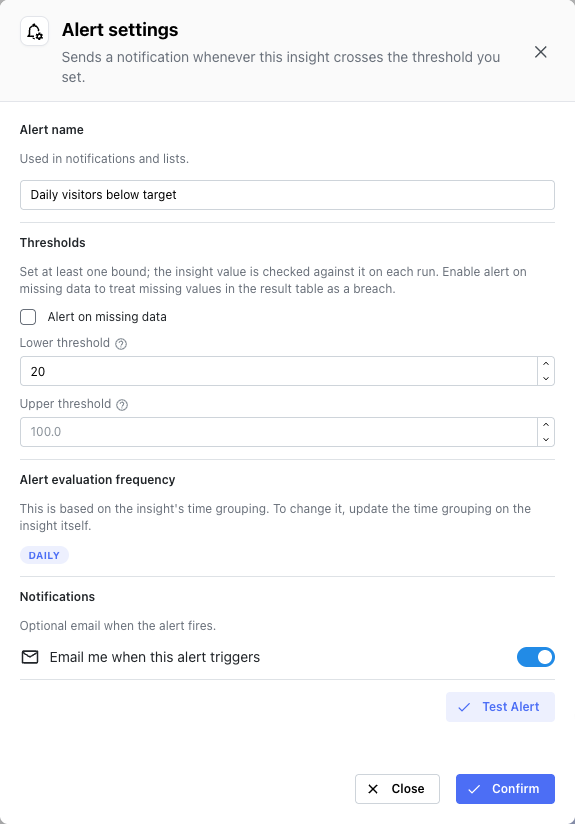
- Open the saved insight and click More actions, then Manage alert. The Alert settings dialog opens.
- Enter an Alert name. The name appears in the notification and in the alert list.
- Set a Lower threshold, an Upper threshold, or both. You need at least one. A lower threshold triggers when the insight value is lower than the number. An upper threshold triggers when the value is higher than the number. For an insight that measures time, the thresholds are in seconds, and the label says so.
- Turn on Alert on missing data if a missing value should count as a breach. See When alerts are checked.
- Turn on Email me when this alert triggers to get the email. Only people who turn this on receive alerts.
- Click Confirm.
The Alert evaluation frequency badge shows Daily, Weekly or Monthly. It follows the time grouping of the insight, so change the time grouping on the insight to change it.
Click Test Alert to check the thresholds before you save them. Mitzu runs the insight as it is on the screen and lists the breaches it finds, up to five. If there are none, the dialog says No threshold breaches in the current result table. The button is enabled once a threshold is set.
To remove the alert, open the same dialog and click Delete alert.
Alerts are sent by email. If your administrator has not set up an SMTP server, the dialog says that alert emails won't be sent until one is set up.
When alerts are checked
An alert is checked each time its insight refreshes on its schedule:
- Daily insights are checked every day at 08:00 UTC.
- Weekly and monthly insights are checked on weekdays at 08:00 UTC.
Only the most recent period of each series is checked. For a daily insight that is the latest day in the chart. Each group in the insight, such as each country, is checked on its own.
With Alert on missing data turned off, a missing value never triggers the alert. With it turned on, a missing value counts as a breach. A series whose latest period is older than the insight's time grouping also counts as missing.
An alert is not checked when its insight is archived. See Archiving.
Nothing is sent when no one has turned on Email me when this alert triggers.
What the email contains
The email subject is Mitzu alert: followed by the alert name. The body says that a threshold alert has
fired for your saved insight, and lists:
- the alert name and the insight name
- the thresholds, for example
lower=10 - each breached group, with its value, its period and the reason, such as below lower threshold, above upper threshold or value missing (no data)
The email attaches a PDF of the chart and has an Open insight in Mitzu link. Mitzu sends it only to people who turned on the email and still have access to the workspace.
Related pages
- Saved insights explains how to save an insight and where its alert is kept.
- Archiving explains what happens to alerts when an insight is archived.